 Jesper Staahl
Forma Site Design, available in the AEC Collection or as a standalone subscription, offers powerful AI-powered tools for architects and designers in pre-design and schematic design phases.
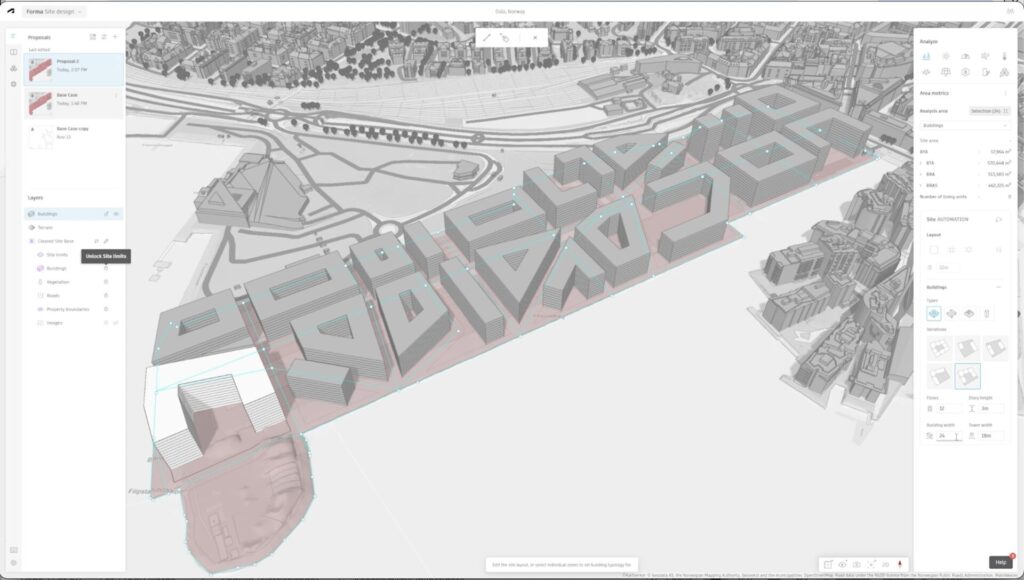
The early stage of a project sets the foundation for success—but it’s also when tight deadlines and budgets hit hardest. Architects need to quickly understand site conditions, test multiple concepts, and keep teams aligned—all while time, resources are limited. They face the pressure to deliver clear direction quickly, often with limited resources, incomplete data, and too little time for iteration. Without the right tools, it risks rushed assessments, errors, and missed opportunities.
Forma Site Design helps architects stay ahead of deadlines without compromising design quality. By automating time-consuming tasks and providing instant access to data, Forma frees up more time for creative problem-solving and confident decision-making.
Here are five ways Forma Site Design saves you time and hassle when it matters most.
1. Centralize team communication with Forma Board
Early-phase chaos often scatters sketches, models, and notes. Forma Board brings everything together in one place, creating a single source of truth for ideas and feedback. This means:
- Less time wasted searching for files and emails
- Smoother feedback process to make informed decisions
- Faster alignment across teams to move forward confidently
2. Automated contextual data for fast site set up
Researching site context such as terrain, property parcels, and surrounding buildings is always time consuming. Forma Site Design automates this process, bringing all your contextual data into one platform. Architects can:
- Set up project sites in minutes
- Align concepts with real-world constraints
- See the bigger picture instantly
Tip: for added detail, integrate GIS data into your proposal using the ArcGIS for Autodesk Forma extension.
Learn how to set up your first site in Forma
3. Instant area metrics for quick feasibility checks
Clients often need answers fast. With instant area metrics in your massing model, calculations update automatically—no more manual spreadsheets. This ensures:
- Fast, accurate numbers for pro forma assessments
- Reduced risk of error when iterating multiple design options
- Confidence in meeting programme and zoning requirements
4. Built-in environmental analysis for confident decision-making
Waiting for building performance reports or switching between analysis and design tools slows progress. Forma Site Design’s integrated environmental analysis delivers crucial data while you’re designing, helping you:
- Evaluate existing site conditions quickly for your site analysis
- Identify challenges early
- Iterate site-specific options without delay
Tip: Add your analysis results directly in Forma Board.
5. Rapid conceptual modeling for quick optioneering
Early phases demand flexibility and speed. Forma Site Design’s 3D modelling and comparison tools let you:
- Generate massing studies fast
- Iterate multiple options in parallel with integrated building performance analysis
- Keep key metrics updated automatically while iterating
Don’t let time pressure limit your design exploration. With built-in analysis, rapid iteration tools, and a unified platform for collaboration, Forma Site Design helps you deliver proven concepts—even under the tightest deadlines.
Frequently asked questions (FAQ)
What is Forma Site Design?
Forma Site Design is an AI-powered, design and analysis software for data-driven planning. It’s used by architects and urban designers in the pre-design and schematic phases to plan sites with confidence.
Forma has import/export support for a range of AEC software, including support for IFC and OBJ, as well as connections to Revit, Dynamo, and Rhino.
What types of projects is Forma Site Design suitable for?
Forma can be used on all project types, especially more complex projects in urban contexts such as mixed-use developments, multi-family housing, commercial, and hotel.
What are Forma Site Design’s main features?
Forma has 3D modeling tools, integrated environmental analysis, automatic contextual data, and Forma Board.
Customize Forma by creating your own extensions or accessing a growing library of third-party extensions from envelope analysis to AI renderings and infrastructure design.
Which environmental analyses does Forma Site Design have?
Forma’s analyses include area metrics, sun hours, wind (AI/rapid and standard) noise (AI/rapid and standard), daylight, solar energy, microclimate, shadows, view, and embodied carbon.
Users also have the option to use analysis extensions from third-party providers or create their own analyses using Forma’s API.
How do I access Forma Site Design?
If you have the AEC Collection you can access Forma at no extra cost.
Standalone subscriptions can be purchased on the Forma Product Center.
If you have an account, log into your Forma hub here.