 Jesper Staahl
Forma Site Design, available in the AEC Collection or as a standalone subscription, offers powerful AI-powered tools for architects and designers in pre-design and schematic design phases.
Tl;dr:
- Store key files related to your project, like maps, references, code, zoning, and regulations on Forma Data Management (formerly Autodesk Docs). This spares you from having to dig them back up every time you lose them. Also, it makes it easier for your teammates to find the same documentation you’re working on.
- Extract key quotes, important design intents, things that guide your project with screenshots and notes and put them on Forma Board linked together with the files on Forma Data Management to create a pin-up that highlights the core design directions you need to base your design on.
- Sketch over and illustrate the design intent you arrive at during this process.
- Share the board with your colleagues for a common understanding of where you are currently in your design thinking as they start the project. They can comment and edit with you.
- Why? Because Forma Board allows you to connect files to Forma Data Management. That means you keep the digital thread as you go. And you get to visually represent this on a pin-up that isn’t taken down from the studio walls every two weeks to make room for the next pin-up.
Early-stage architectural design is rarely short on ideas, inspiration, requirements, regulations, references, or stakeholders. What often lacks is shared clarity.
At the start of a project, information arrives from many directions: site constraints, early massing models, environmental metrics, reference imagery, screenshots, notes from meetings, and informal assumptions. By the end of the day your browser probably looks like mine: 5 windows, 34 tabs, a medieval map of Nottingham, and a referendum from a council town hall meeting from 2017 that somehow is relevant for the site you’ve been hired to design on.
Each input may be valuable, but when these elements live across emails, chat threads, local folders, and slide decks, teams struggle to build a shared understanding. This fragmentation creates friction later. New team members lack context. Decisions need to be re-explained. Early intent is lost just as collaboration intensifies.
The challenge is not capturing everything, but capturing the right information early and pinning it up clearly and accessibly for future reference.
Watch my video below which explains exactly how to do this or keep reading below for an in-depth breakdown of the workflow and how it benefits you.
Why use Forma Data Management and Forma Board to capture the broad strokes
In early design, precision is not the priority—context is.
Architects need to work in broad strokes: testing ideas, comparing directions, and identifying meaningful trade-offs without committing too early. Forma Board supports this approach by providing a shared, visual space where early material can be gathered as it emerges.
And you can use it for all the stages of conceptual and schematic design in architecture such as design option pin-ups, site analysis, site model discussions, references and inspiration pictures, site visit maps, and of course early performance insights. It’s the natural progression of pin up sessions, quick informal presentations, teams capturing information continuously, and creating a living snapshot of the project teams’ common thinking.
This helps us:
- See relationships between options
- Understand trade-offs at a glance
- Focus discussion on intent, not polish
By keeping the emphasis on clarity rather than detail, Forma Board can help teams move forward without narrowing exploration too soon.
Turn scattered inputs into shared understanding in Forma Board
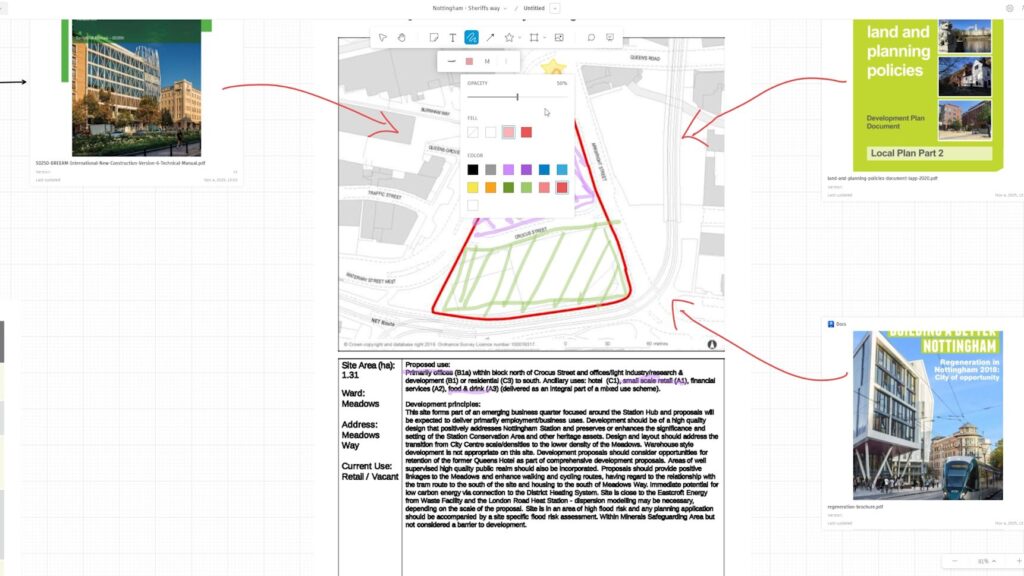
As projects progress, early ideas need to connect to structured collaboration. This is where Forma Data Management plays a critical role as the Common Data Environment (CDE).
Forma Data Management provides a centralized, governed space for project information; drawings, documents, references, and decisions gathered across teams and phases. When early context captured in Forma Board is stored in Forma Data Management, you avoid the common reset that happens whenever you accidentally close a browser on a Friday, or the context that teams lose between concept design and later stages.
Instead of losing early intent, teams preserve:
- Key references and assumptions visually pinned up.
- Rationale behind early decisions, through comments and sticky notes.
- Shared understanding of constraints and priorities, through key illustrations.
Forma Board supports exploration and alignment. Forma Data Management ensures that this context remains accessible, traceable, and ready for collaboration as more contributors join the project.
Starting off on the right foot prepares us for future collaboration
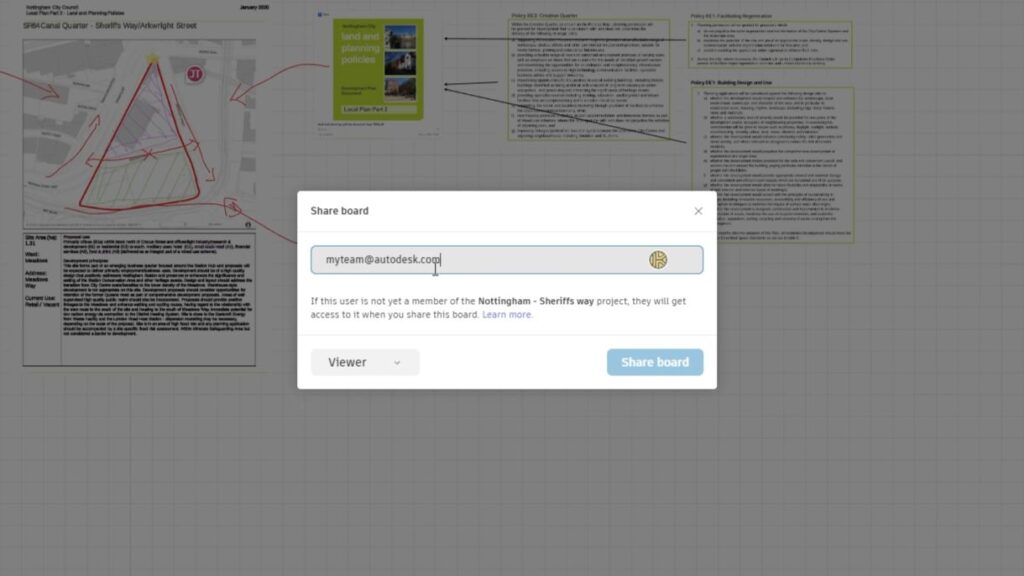
Capturing information early is not about locking decisions; it’s about preparing teams to collaborate effectively later.
When coworkers join first, and later consultants, project managers, or downstream teams join, they don’t just see the current design state. They see how the project arrived there. This reduces onboarding time, reduces rework, and supports more confident decision-making as complexity increases.
By combining Forma Board for early-stage sense-making with Forma Data Management as a common data environment, teams create continuity across phases. Early design becomes the foundation for collaboration, not a disconnected starting point.
In that way, capturing key information early—clearly and in broad strokes—is not just good design practice. It’s a practical step toward better coordination, clearer communication, and more resilient project workflows.