 Ellis Herman
Forma Building Design, available in the AEC Collection, Revit standalone license, and Forma for Buildings bundle, helps architects explore more ideas before it’s time for BIM.
Note: Total carbon is currently available for the US. Stay tuned for news about availability for other regions.
Design decisions shape carbon outcomes from the very first massing move. Run a Total Carbon analysis in Forma Building Design to understand the embodied and operational carbon impact during early-phase workflows. Think of it as an early-stage total carbon calculator.
The workflow described in this article shows you how to generate results in Forma Building Design and continue the analysis in Forma Carbon Insights (formerly Autodesk Insight) if you need more detail.
If you want to learn more about Forma Carbon Insights, or the data or methods behind the analysis, see the documentation in the Revit help here.
Note: Total carbon is currently available for the US. Stay tuned for news about availability for other regions.
How to run a Total Carbon analysis in Forma Building Design
Open your design proposal in Forma Building Design.
1. Enter the Total Carbon analysis, as shown below:
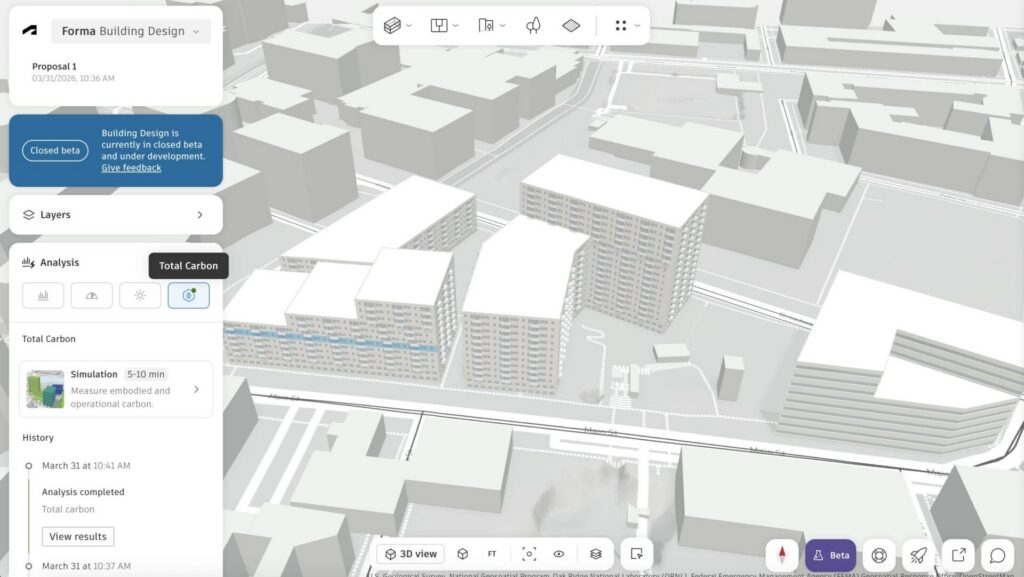
2. Select the building or buildings you want to analyze.
3. In the left panel, review and adjust the analysis settings:
- Building type
- Exterior walls
- Window-to-wall ratio (WWR)
- Other configurable parameters
4. Click Run analysis.
5. You can close the analysis window. The status appears in Analysis History as In progress and updates automatically when complete.
Operational carbon calculations rely on an Energy Analytical Model (EAM) and gbXML-based workflows. For more information, see:
Review total carbon results
Once the analysis is completed, the results panel displays the following:
- Total Carbon
- Embodied Carbon
- Operational Carbon
Use these results to compare how changes to massing, envelope assumptions, or other settings affect carbon outcomes.
To test alternatives:
- Adjust one or more analysis settings.
- Click Run analysis again.
- Compare the updated results.
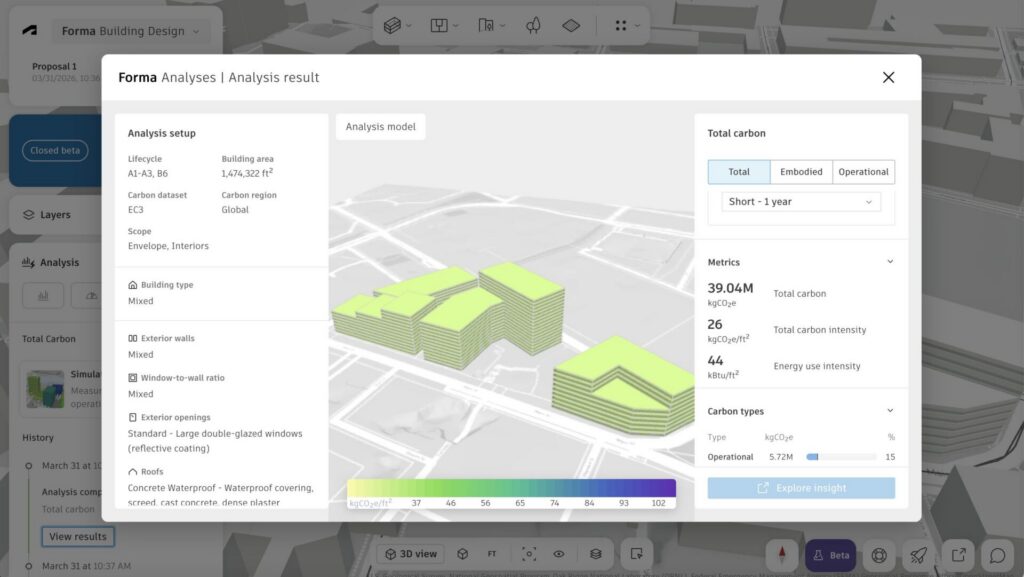
Open the analysis in Forma Carbon Insights
For more detailed configuration and transparency, click Open in Forma Carbon Insights.
In Forma Carbon Insights, you can:
- Configure custom factors, benchmarks, and dashboards.
- Run additional simulations with more detailed inputs.
- Review the data and calculations behind the results.
- Collaborate with sustainability consultants or engineers.
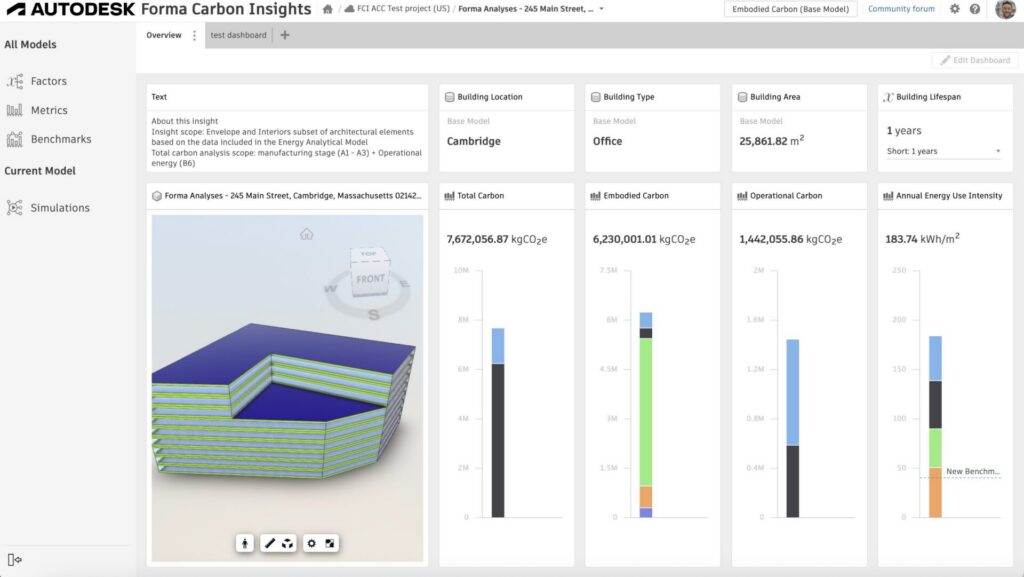
The analysis in Forma Building Design provides embedded, high-level guidance. Forma Carbon Insights gives you configurability and depth. Together, they support a connected workflow from early massing to more detailed analysis.
Recommended workflow
- Shape your building.
- Enter Total Carbon.
- Adjust assumptions.
- Click Run analysis.
- Compare, iterate, and refine.
- Open in Forma Carbon Insights when you need more detail.
If you cannot connect to the Forma Carbon Insights dashboard, make sure that *.autodesk.com is not blocked by your firewall.
Privacy
Forma Carbon Insights dashboards can be shared via URL to any other members of the ACC project.
We encourage you to be mindful when sharing links, as the Forma Site/Building Design-level permissioning will not prohibit viewing and editing of the dashboard; anyone with access to the ACC project will have full viewing and editing permissions.
Frequently asked questions
What is Forma Building Design?
What is difference between Forma Site Design and Forma Building Design?
Forma Building Design helps teams determine building design direction for specific plots and blocks, including unit mix — so they can explore more ideas before it’s time for BIM and then move forward. It is used for schematic design.
Teams can easily switch between Site Design and Building Design with the direct integration.