 Autodesk Forma Team
Forma Building Design, available in the AEC Collection, Revit standalone license, and Forma for Buildings bundle, helps architects explore more ideas before it’s time for BIM.
Design now, Revit next: Explore more ideas before it’s time for BIM.
Today, we’re excited to launch the first step of Forma Building Design—a cloud-based design and analysis software built for the schematic design phase. Forma Building Design makes early design exploration faster and lower-effort, helping architects shape multiple options quickly, test performance, and define design direction before moving directly into Revit.
Connecting schematic design exploration with BIM
Forma Building Design is built to work together with Forma Site Design and Revit, connecting schematic design exploration with detailed design and later construction documentation within one ecosystem.
By reducing the time and effort it takes to explore and test different ideas, Forma Building Design helps teams avoid a common challenge during schematic design: when limited design exploration during tight deadlines risks leading teams to commit to a direction without full confidence. This potentially results in costly revisions and delays in later phases when decisions need to be reversed.
Architect-led product development
From the start, Forma Building Design is being shaped and tested by architects, ensuring the product is grounded in day-to-day workflows and design problems. Their feedback continues to inform Forma Building Design as it evolves.
What can you do with Forma Building Design?
With Forma Building Design, teams can:
- Add details to buildings in minutes: Shape design direction before complex modelling with easy tools and design automations to add and edit facades, floor plans, and units.
- Test more what ifs with less effort: Explore multiple options with confidence and see how they perform, with analysis built in as you design.
- Move into Revit without starting over: Bring your design forward at any time as a geolocated, native Revit model your team can build on with clarity.
With easy access from the browser without any setup, it’s easy to get started in Forma Building Design.
Data-driven schematic design exploration—powered by automation and integrated analysis
Forma Building Design enables flexible, fast schematic design exploration and informed early decision-making with these initial capabilities. Functionality will continue to expand.
Site context: Set up your geolocated site faster with automatic contextual data.
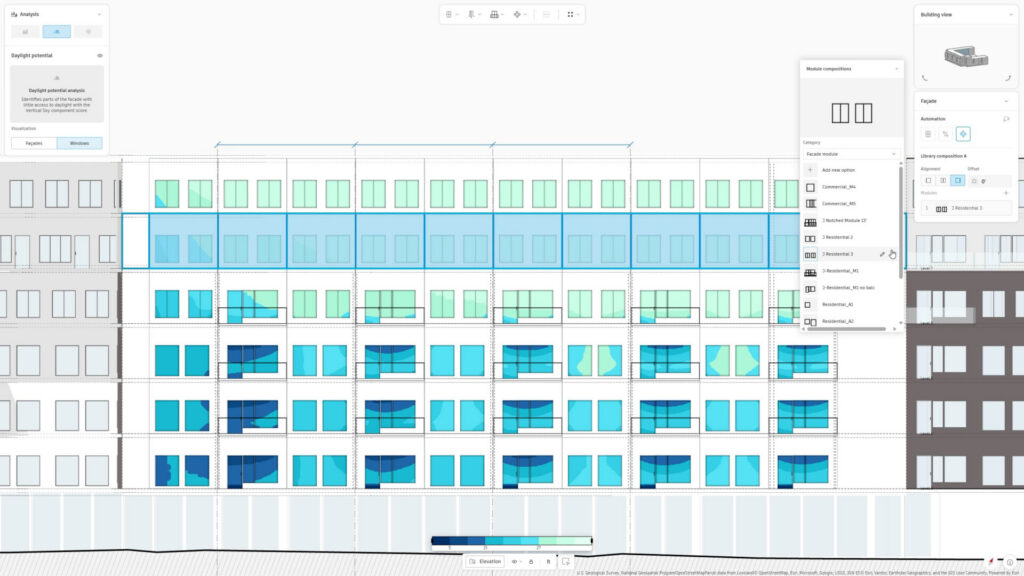
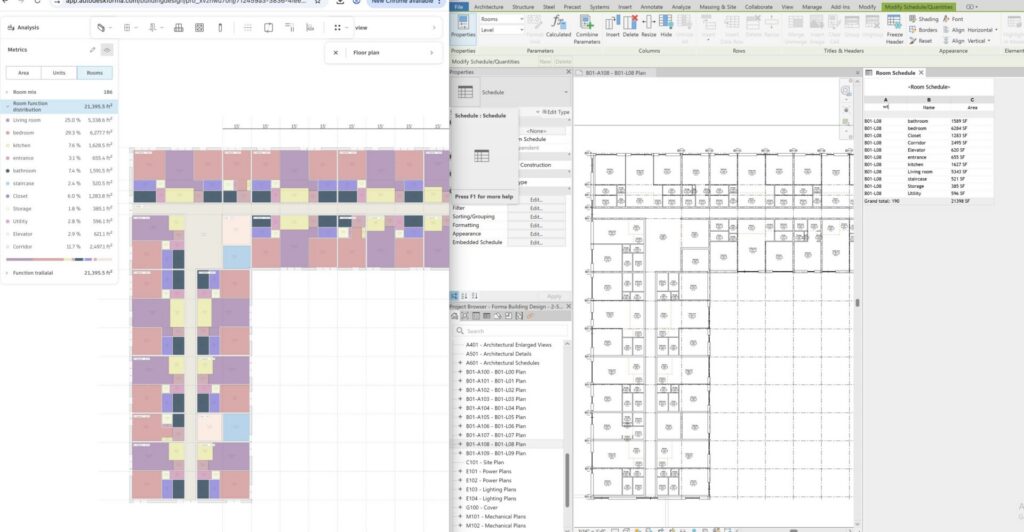
Design automations: Create and edit floor plans and modular facades with a few clicks – they update automatically in plan, elevation, and perspective with any changes. Snap walls to grids and customize groups of windows, doors, and balconies. Track unit mix with automatic area metrics and schedules.
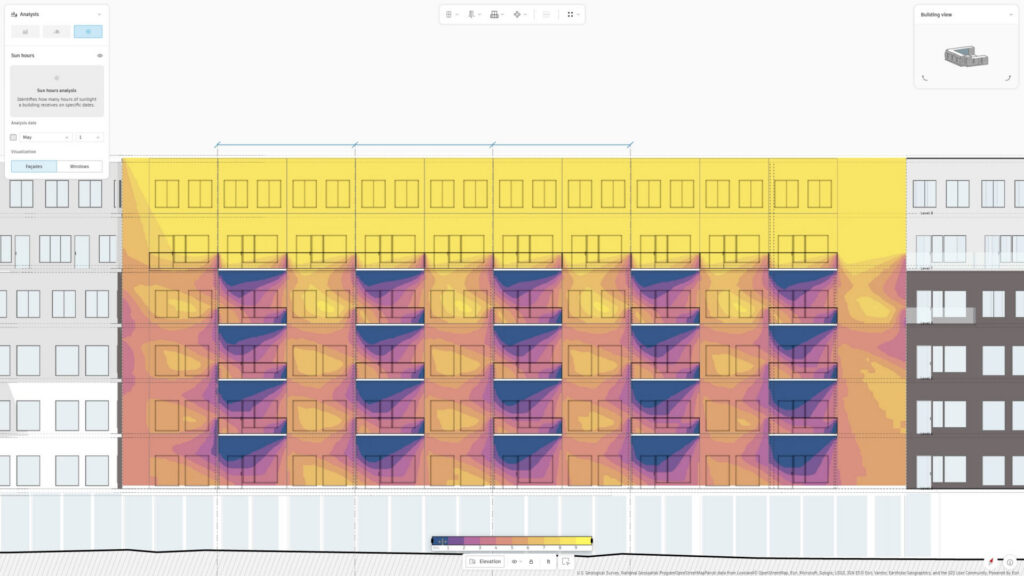
Integrated analysis: Improve building performance while you’re designing with analyses such as sun hours and daylight potential for facades and windows, and total carbon (Note: Total carbon is currently available for the US. Stay tuned for news about other regions).
Direct connection with Revit: Turn your Building Design project into a geolocated, native Revit model, complete with site context and families for windows, slabs, and walls. Keep your projects connected in the Forma Industry Cloud to reduce rework.
How does Building Design work with Forma Site Design?
Architects can combine Forma Site Design and Forma Building Design in their planning and design workflows to move easily between the urban- and building scales.
Forma Site Design helps teams understand wider site conditions during site analysis and optimize the site’s potential for feasibility studies.
Forma Building Design helps teams determine building design direction for specific plots and blocks, and unit mix.
Ready to get started? Here’s how to access Forma Building Design:
If you have the AEC Collection or a Revit subscription, then you already have Forma Building Design.
Click the button below to get started.
Go to Forma Home and select Building Design.
Forma Building Design is also included in the Forma for Buildings bundle, along with Site Design, Forma Data Management, and Forma Board. Get started with a free trial below.
Frequently asked questions
What is Forma Building Design
It’s built for architects working on schematic design projects, especially on larger-scale residential and mixed-use urban projects with repetition across facade elements and floor plan layouts.
What is difference between Forma Site Design and Forma Building Design?
Forma Building Design helps teams determine building design direction for specific plots and blocks, including unit mix — so they can explore more ideas before it’s time for BIM and then move forward. It is used for schematic design.
Teams can easily switch between Site Design and Building Design with a direct integration.