 Autodesk Media & Entertainment
Discover how Autodesk Flow Production Tracking (formerly ShotGrid) and Autodesk Flow Capture (formerly Moxion) give ShadowMachine the organizational superpowers to wrangle an abundance of stop-motion props and sets into a hit series.

In the world of The Tiny Chef Show, Tiny Chef whips up vegan dishes from within his tree stump studio, with help from his robot best friend Olly, while a musical group of living kitchen utensils accompanies them. It’s a delightful family-friendly fantasy where things usually just work out in the end.
Meanwhile, in the “real world,” a group of stop-motion animation artists at ShadowMachine in Portland, Oregon have to work very hard and stay extremely organized to bring this labor-intensive stop-motion animated show to its fans. Even a small disruption to the art department’s workflow can throw off production to be over budget and behind schedule.
However, dynamic changes are a fact of life in stop-motion animation, and art departments have to deal with them without derailing production. As Art Production Supervisor at ShadowMachine, Whitney Schmerber oversees all scheduling, staffing, purchasing, tracking, and inventories for the art department, and did so for both Seasons 2 and 3 of The Tiny Chef Show.
At SIGGRAPH 2025, Whitney presented “Streamlining Stop-Motion Productions in the Big World of Tiny Chef” to show how ShadowMachine kept timelines clear amidst the rigors of redesigning stop-motion sets and producing large batches of props for the animators to work with. Leaning on the powerful production management capabilities of Flow Production Tracking helped Schmerber streamline asset management and scheduling in a demanding environment that orchestrates both analog and digital processes. The session was part of Autodesk’s Vision Series, where studios and artists share behind-the-scenes of the year’s biggest blockbusters, and explore how AI and open, connected workflows are transforming the creative process.
ShadowMachine’s Art Department Workflow
Before any shooting of The Tiny Chef Show, the ShadowMachine art department sees to its scheduling, set design, fabrication, and final set assembly. “To get all this work done is really complex, and it requires input from a lot of different people and a lot of different departments,” Schmerber says.
In this video, Schmerber comprehensively breaks down the show’s art production workflow. It starts with scheduling (01:46) the entire shooting order, including how many duplicate puppets and art pieces are needed to finish on time. That then determines the delivery schedule, which Schmerber and the puppet department use to determine the fabrication of every set, puppet, and prop.
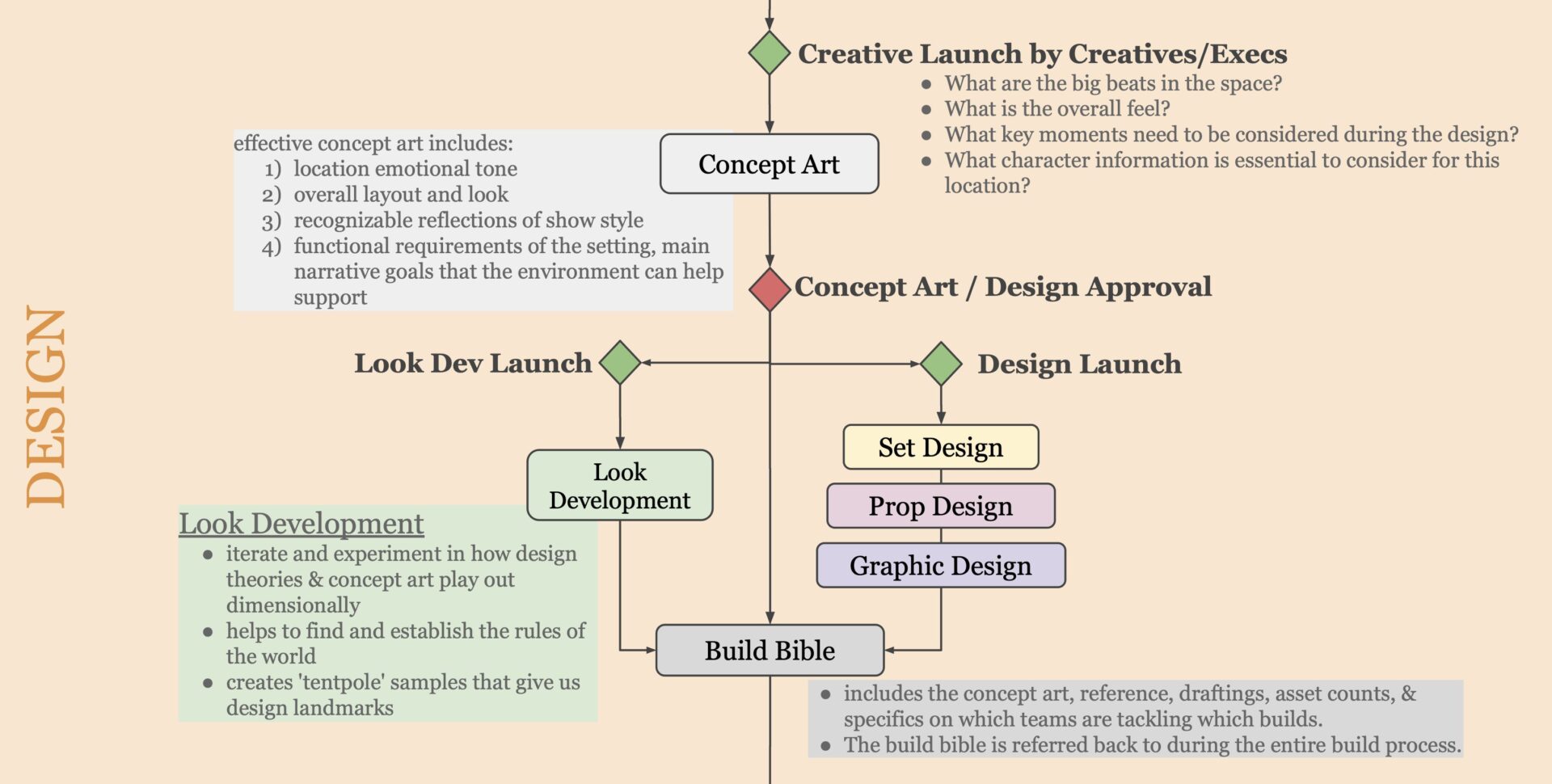
Next, the design process (02:20) launches by integrating the show’s locations, emotional tone, overall layout and look, style, and main narrative goals into the initial concept art. They then launch design teams for set, prop, and graphic design, as well as look development (lookdev). “Look development… helps iterate and experiment in how design theories and concept art play out dimensionally,” Schmerber says. They compile all of the above art and information into a “Build Bible,” which the fabricators and other artists refer to for accuracy through the entire process.
Every asset they build for the show passes through the different fabrication (04:04) teams: set fabrication, landscapes, model shop, mold/cast, and scenic. Some props also need buy off from the rigging, camera, or puppets teams, to make sure a puppet can correctly hold or interact with the prop, for example.
With everything fabricated, final set assembly (05:07) can begin. The sets are broken down into movable pieces and transported to the units for reassembly. The set dressers perform onstage vetting (OSV) by setting up everything as it needs to be for a wide-angle review to get buy off from the director and creative executives.
This art production workflow needs to be repeated for every set build. “And we need to track these tasks along the way,” Schmerber says. “Although the process is complex, task management and asset tracking shouldn’t be.”
Flow Production Tracking Schedules
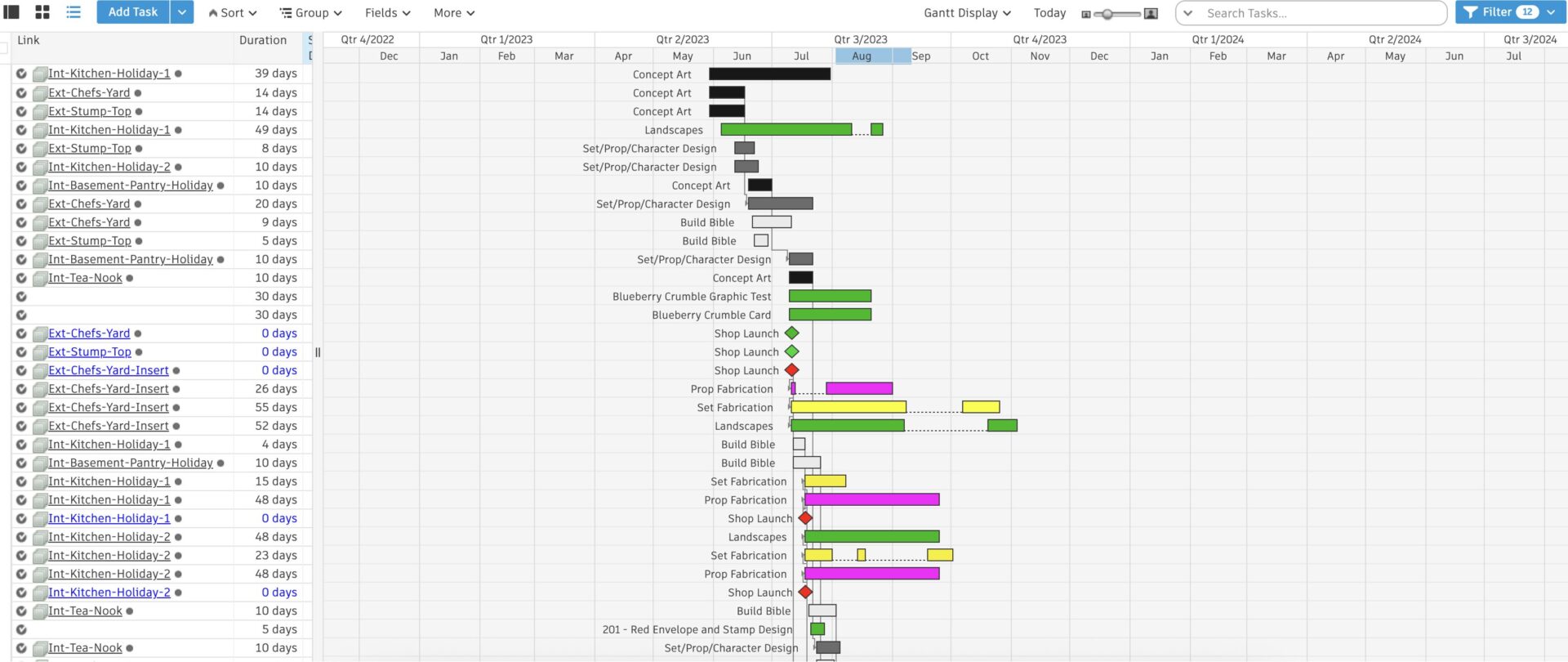
To reign in this large and multifaceted workload, Schmerber sets up task assignments and waterfall charts with Flow Production Tracking. She lays out each task with dependencies based on the art production workflow (06:21), in order to make individual task templates for the different set and part needs of every set build. She had “simple” and “complex” task templates for set parts, refurbished parts & sets from Season 1, and all the new set builds for Seasons 2 & 3.
Schmerber then stamps those tasks onto all their different locations and puts it all together in the art department build schedule (07:41). The schedule will be hundreds of tasks long, but Flow Production Tracking allows her to sort them into separate and color-coded team-specific schedules. Then she can easily see and cater to the workloads on the set fab schedule, the model shop schedule, the scenic schedule, and the landscape schedule.
The Tiny Chef Show Season 2 Redesigns
ShadowMachine was brought on as the production company for The Tiny Chef Show Season 2, and Schmerber says it’s tricky to redesign an existing show, because you want to respect and pay homage to what the fan base loves about the existing environments and designs. So, the design teams thought a lot about the principals for design (08:16) that factor into The Tiny Chef Show’s success. The show is cute, kid-forward, based in reality, beautiful, warm, lighthearted, and endearing.
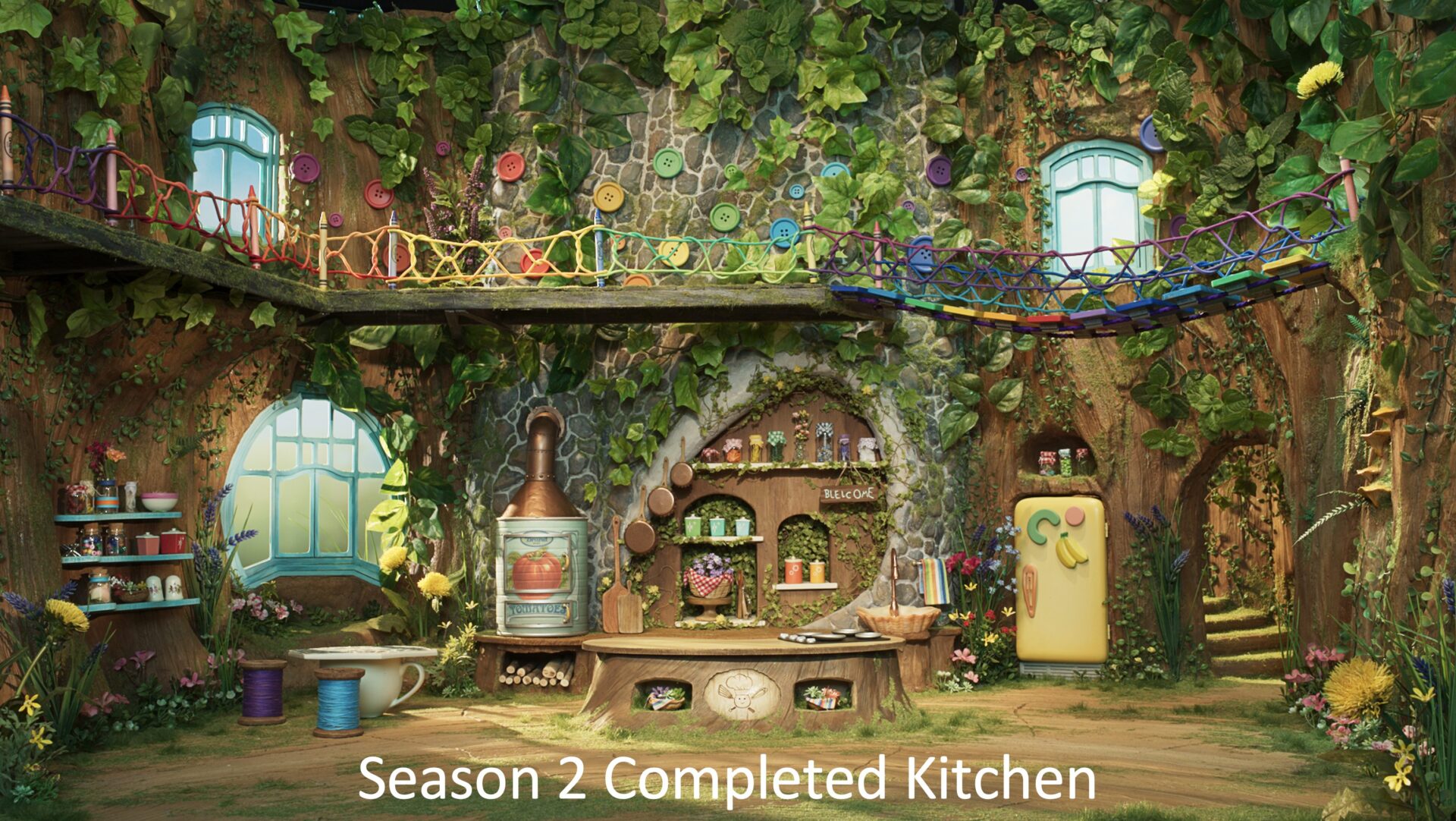
With all that in mind, they embarked on redesigning a number of environments, and Schmerber takes the viewers through them one by one. For the Interior Kitchen redesign (08:50-12:24), they considered the Original LA Kitchen (08:58) that was used in social media releases, and the Season 1 Kitchen (09:41). Their Season 2 Kitchen Design concept art (10:05) kept elements like rope work, stone work, and the shape of the kitchen island, while adding elements like a refrigerator and a more interesting kitchen wall background. You can see the Kitchen Wall Sculpt Review 1 and the Kitchen Wall Sculpt Review 2 to see the evolution of the design leading up to the colorful, playful, and fun Season 2 Completed Kitchen.
They also redesigned the Interior Chef’s Bedroom (12:25-14:46). Again, they reviewed the existing bedroom designs to help inform their Season 2 – Bedroom Design concept art. Schmerber also revealed an “Easter egg” wherein the shape of Chef’s bedroom seen from above is the same shape as his chef’s hat. And they integrated the Season 1 Bedroom Floor, which builds mahjong tiles, dominoes, and rulers into the floorboards. You can see that the Season 2 – Completed Bedroom incorporates details like postage stamps as wall art and a cupcake liner as a lampshade.
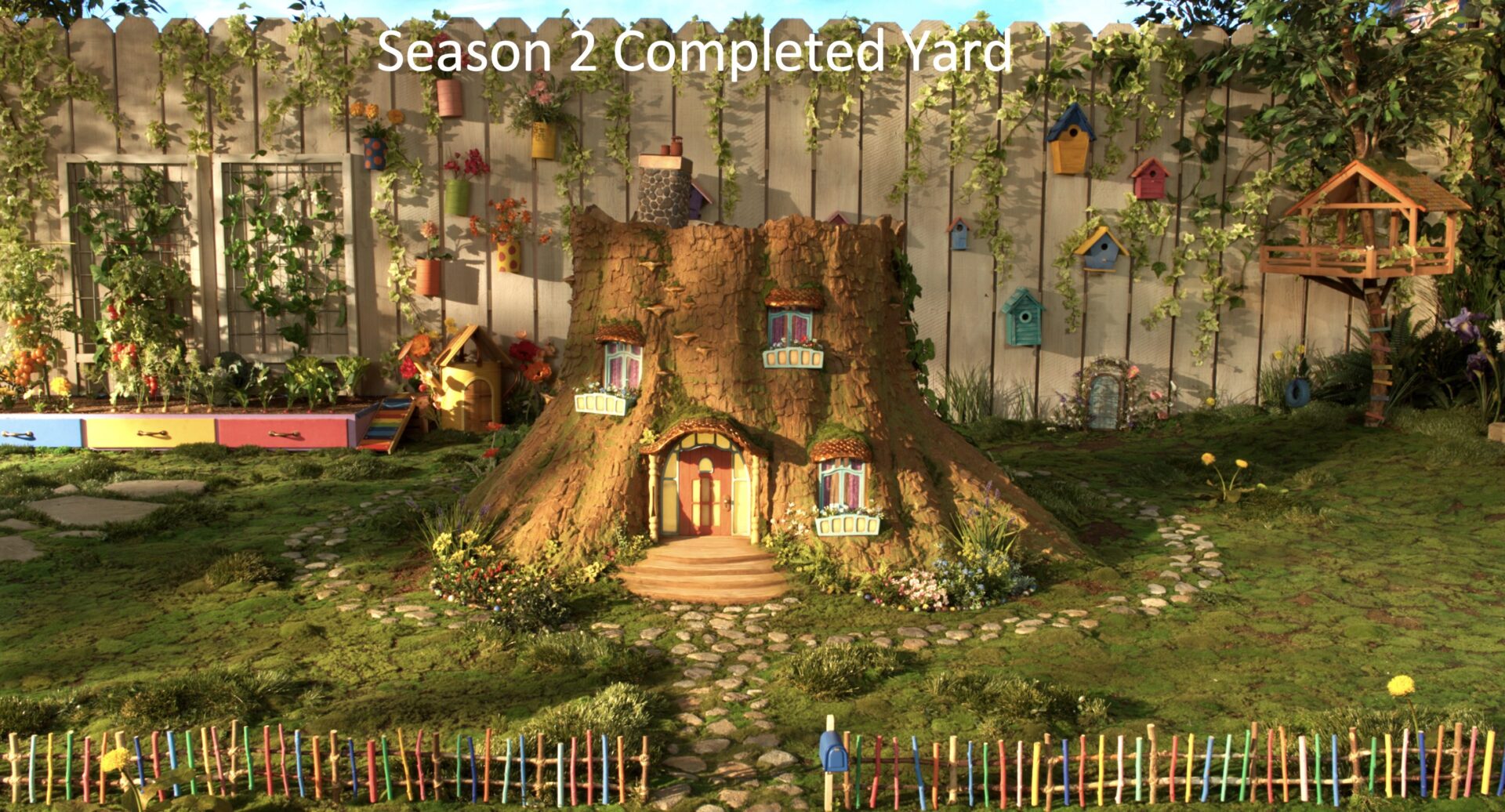
As Schmerber’s final case study, ShadowMachine redesigned the entire Exterior Chef’s Yard (14:50-18:01) “a really important environment in his world,” she says, “and we wanted to do it justice.” They were told to address, for example, the bark texture of Chef’s tree stump house and the flat yard topography from the Season 1 – Chef’s Yard. Schmerber shows stages of the yard’s design evolution leading to the Season 2 Yard Design concept art. She also reveals the set deck breakdowns, which divide the yard set into puzzle piece decks that can be taken out so that animators and camera setups can access every part of the set when needed. Finally, the Season 2 Completed Yard design creates an ornate backdrop for the opening credits of The Tiny Chef Show Season 2.
More Props, More Problems to Solve
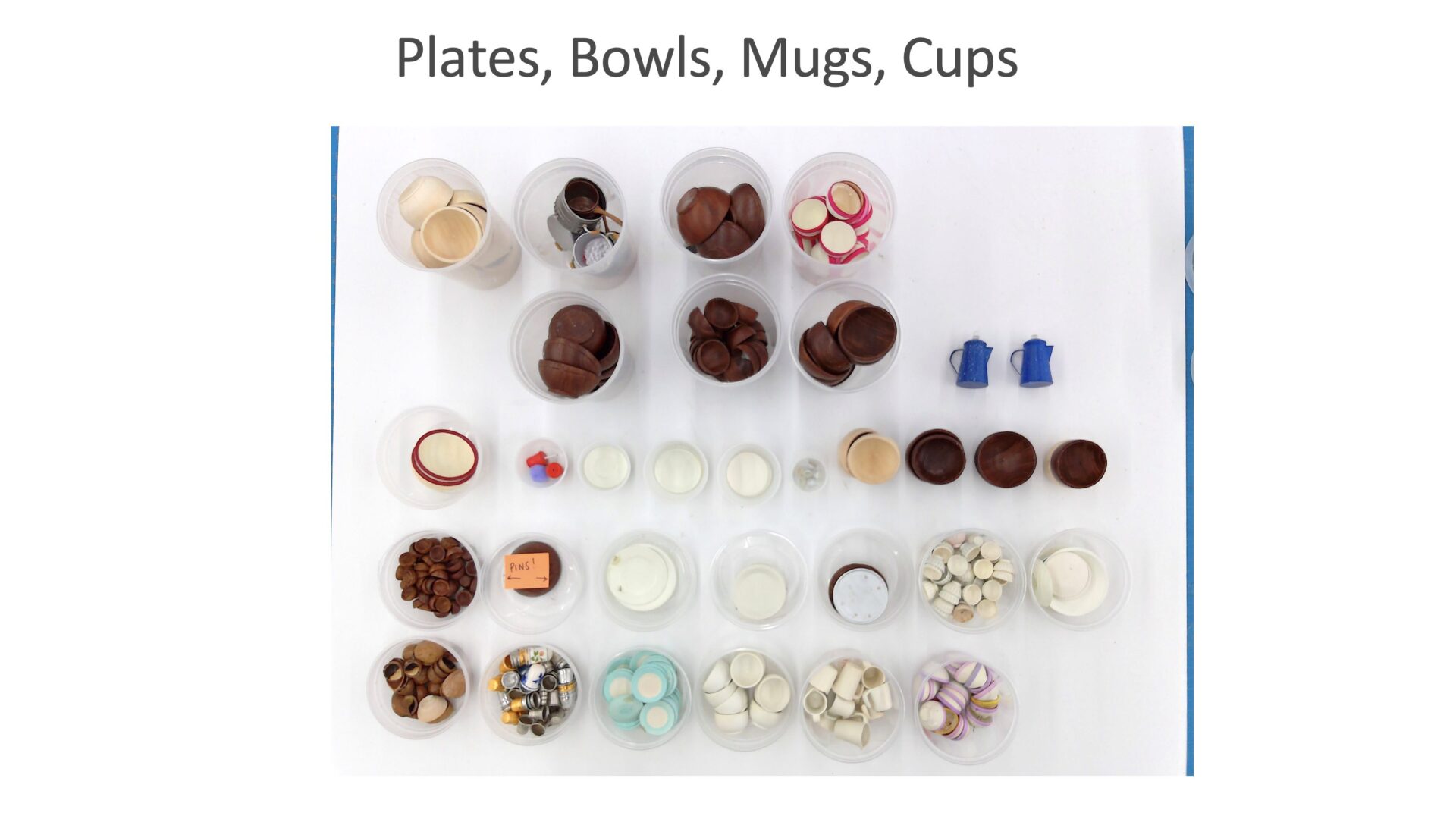
Along with all these sets come heaps upon heaps of “smalls,” (18:13) such as plates, bowls, mugs, cooking utensils, pots, pans, lids, trays, cutting boards, and even instruments and microphones for The Stump Band. In addition to these hundreds of items, each episode inevitably requires unique props and sets that were not considered in the initial build schedule.
Schmerber had to try to anticipate whether they would have time to build all the new props for each episode before the crew rolled off. Again, she turned to Flow Production Tracking to separate the pre-planned prop builds from the new builds for episodes (19:23). When she tracked out different scenarios for fabricating the new props, the scheduling demands did not fit with the show’s timeline. In the end, Flow Production Tracking helped Schmerber dynamically move through options to arrive at a final schedule. This required them to limit the number of new props they could build per episode and to reuse existing inventory and/or purchase solutions that require little additional labor. You can see some of the episode-specific food props and furniture.
ShadowMachine’s Flow Capture Future
Flow Production Tracking helps ShadowMachine tie together the work and many design, fabrication, and production teams working across both analog and digital processes. However, Schmerber says as the company moves more toward hiring remote directors for its productions, Autodesk Flow Capture will streamline its communications.
With Flow Capture, ShadowMachine’s remote directors will be able to securely review and give notes in real-time to people in the shooting units through high-quality live views. The review tool also handles lighting reviews and live previs views, with the ability to adjust specific color settings on reviewers’ devices so that everyone is seeing the same thing. Flow Capture acts as a single source of truth for all staff members and clients with access, either onsite or remote, and their notes can integrate back into Flow Production Tracking. Flow Capture will even allow ShadowMachine to securely share 3D print files with outside vendors. “At ShadowMachine, we’re really excited about our future,” Schmerber says, “and how Flow Production Tracking and Flow Capture will help pave the way for more streamlined processes and communication.”