 Autodesk Media & Entertainment
Film, television, and game development teams rely on highly iterative pipelines that have long been organized in a waterfall model. Today, as production complexity increases, teams are rethinking how they collaborate across set, editorial, and post-production, creating more connected ways to share feedback and keep critical information aligned. Autodesk Flow supports this shift as the industry cloud for media and entertainment. It connects everyone, anywhere, with the workflows, production data, and shared context needed to keep production moving from set through post-production.
Built on Autodesk’s Design and Make Platform with open standards and an open ecosystem, Autodesk Flow’s connected foundation takes shape through specific cloud-based solutions, each designed for a different part of the production lifecycle. Flow Capture brings production, editorial, and post-production teams together in a secure, cloud-based environment, enabling footage, reviews, and feedback to be shared in real time for faster, more collaborative decision making. Flow Production Tracking serves as the central hub for coordinating shots, tasks, versions, notes, schedules, and approvals across the production lifecycle. Flow Studio accelerates previs and early shot development through controllable AI, producing editable outputs that keep creative control firmly in the hands of artists. Together, these tools help teams work with greater speed, clarity, and continuity across production.
With these tailored solutions powering different stages of the pipeline, Autodesk Flow gives studios a connected way to work faster and smarter in today’s demanding media environment.
How each Flow product fits into the pipeline
To understand Autodesk Flow in practice, it helps to look at the role of each Flow solution across the production lifecycle. Each one addresses a distinct workflow need, and together they create a shared foundation that helps teams move faster with less friction.
Autodesk Flow
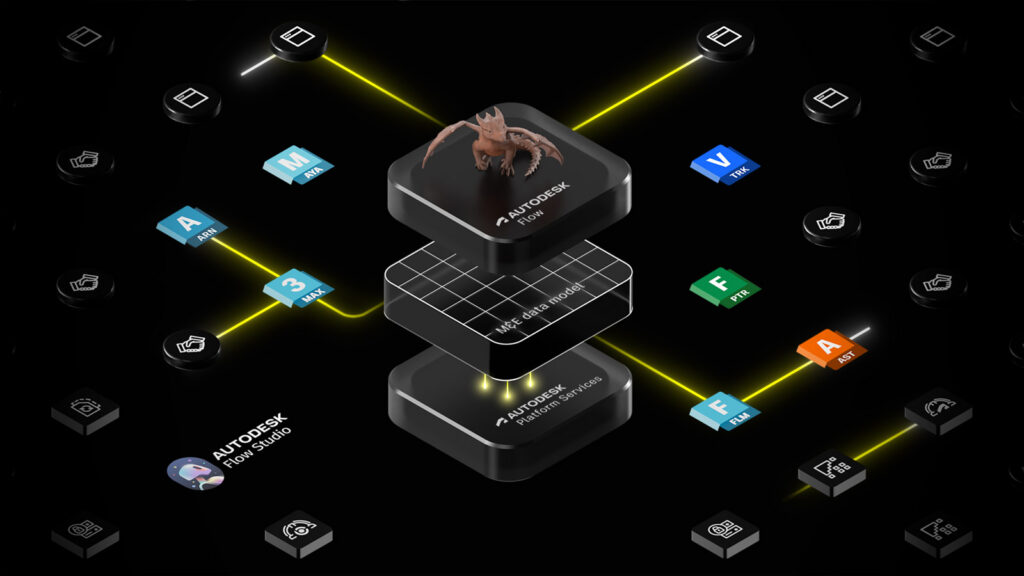
Autodesk Flow represents a shift from isolated, file-based handoffs to a more connected, data-centric production environment. As Autodesk’s industry cloud for media and entertainment, it brings Flow Capture, Flow Production Tracking, Flow Studio, and related capabilities into a shared ecosystem that helps data, context, and creative intent move from production to post-production.
Autodesk Flow’s value lies in openness and extensibility. Teams can connect existing third-party tools, adopt newer cloud and AI workflows, and build toward a more interoperable pipeline without rebuilding everything at once. This foundation also extends into capabilities such as Shared Playlists, Flow Generative Scheduling, and Animating in Context (AiC) as well as cloud-based services such as Flow Retopology, Flow Wedging, and Flow Graph Engine API. Through the Flow Graph Engine API, studios can move compute-heavy processing to the cloud, while capabilities such as Flow Retopology and Flow Wedging let artists run mesh optimization and simulation variations in parallel without overloading local machines. The result is a more connected production environment that helps studios adapt as project complexity and data volumes grow.
Flow Capture
Flow Capture is Autodesk’s secure, cloud-based review and collaboration solution, designed to connect production and post-production in a unified, real-time environment. It brings together advanced dailies workflows, real-time review, and enterprise-grade security into a single toolset that enables production teams to move seamlessly from capture to collaboration.
By bridging on-set capture with cloud-based workflows, Flow Capture makes footage and metadata available to distributed teams within minutes – supporting both live, synchronous review and flexible, asynchronous feedback. Directors, editors, producers, and stakeholders can collaborate in real time or on their own schedules, all within a shared, high-fidelity review experience.
Flow Capture serves as a central hub for modern production workflows, integrating with creative tools and streamlining handoffs across teams. With built-in security, real-time streaming, and connected workflows, it reduces delays, minimizes risk, and empowers teams to make faster, more informed creative decisions from anywhere.

Flow Studio
Flow Studio brings complex VFX work closer to the moment of creative intent—whether you’re a director, supervisor, or artist. It accelerates early-stage workflows, enabling teams to make key creative decisions sooner, when they’re most impactful.
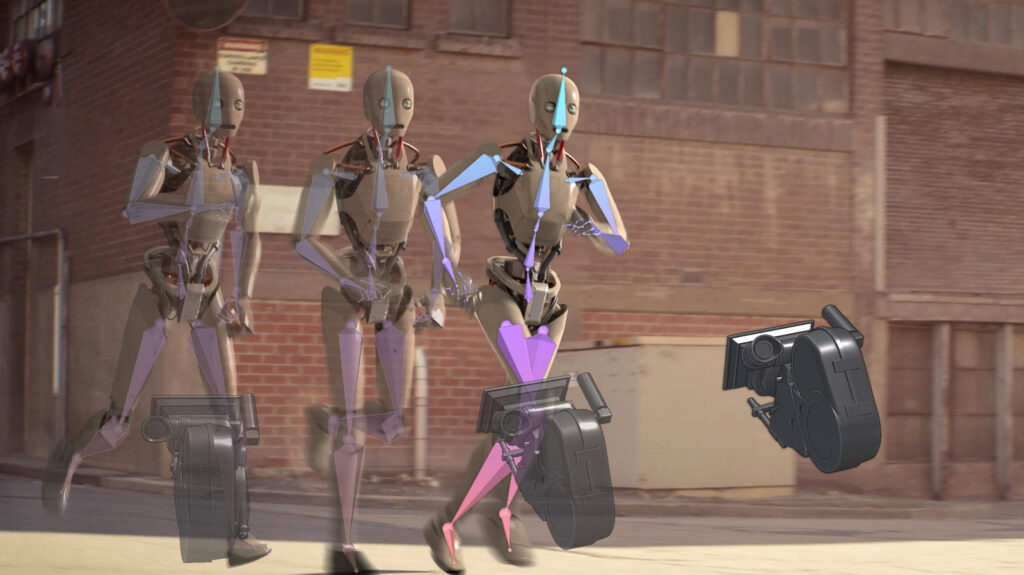
At its core, Flow Studio is a unified, AI-powered 3D toolkit that fits seamlessly into modern production pipelines. It uses directable, controllable AI to transform live-action footage into editable CG scenes—generating essential elements such as motion capture data, camera tracking, clean plates, and full 3D environments. Rather than replacing downstream work, these outputs are designed to integrate with existing tools, allowing artists to continue refining animation, lighting, and camera work within their established workflows.
Flow Studio supports a range of use cases, from markerless motion capture for performance-driven shots to rapid shot blocking for previs, as well as quick generation of 3D assets to populate environments or prototype ideas. The result is a faster, more scalable way to explore and iterate on shots—without sacrificing creative control or artist-driven refinement.
Flow Production Tracking
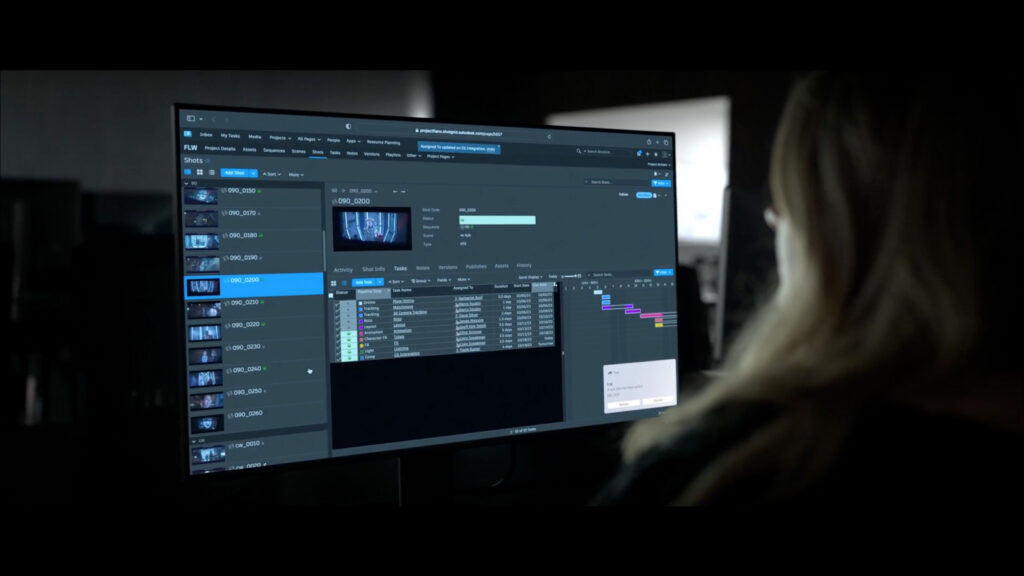
Flow Production Tracking is an advanced production management and review toolset for VFX, animation, and game development teams. It connects production data, workflows, and teams in a single environment, giving studios clearer visibility as work moves through the pipeline.
By centralizing tasks, assets, schedules, and review activity, Flow Production Tracking helps producers, supervisors, and studio leaders stay aligned across projects, teams, and locations. With shared visibility into progress, resources, and dependencies, teams can anticipate issues earlier, reduce rework, and keep productions on track.
Flow Production Tracking serves as the operational backbone for modern content creation, integrating with creative tools and adapting to each studio’s pipeline. With flexible workflows, scalable infrastructure, and connected data, it enables studios to manage complexity with confidence, so teams can focus more on creative execution and less on coordination overhead.
Quick pick for busy teams
Autodesk Flow: Cloud-based collaboration platform for media and entertainment teams
Why use Autodesk Flow?
When you need a connected layer that keeps production data, review history, and creative intent aligned across production, editorial, and post-production.
What can you do with Autodesk Flow?
Autodesk Flow gives you shared, cloud-based context across the production lifecycle. Shared Playlists let you work from the same playlists in Flow Production Tracking and Flow Capture, cutting down on manual handoffs and duplicate setup. Animating in Context brings editorial cuts from Flow Production Tracking into Maya, so your artists can see the surrounding shot context and make better continuity decisions without leaving their workspace. In short, Flow acts as the connective layer across media and entertainment workflows, reducing friction as work moves from production to editorial to post-production.
Flow Capture: Secure cloud dailies, live review, and editorial handoff
Why use Flow Capture?
When you need production crews, editorial, and stakeholders to review footage together, make decisions in real time, and move faster into post-production.
What can you do with Flow Capture?
Flow Capture gives you a secure, cloud-based workspace for dailies and review. With Flow Capture Rooms, teams can review footage in real time using synchronized playback, chat, and frame-specific annotations from any location.
For editorial, the Flow Capture Panel for Avid Media Composer helps you move faster by giving you secure access to production dailies, proxy files, and native DNxHD media. From there, you can move selected assets into bins, send sequences for review, and bring comments or markers back into the timeline.
Studio-grade security features, including forensic and burnt-in watermarking, granular access controls, and digital rights management, help protect sensitive IP while enabling seamless collaboration across teams and locations.
Flow Production Tracking: Centralized production management and review
Why use Flow Production Tracking?
When you need a consistent source of truth—one that keeps you ahead of bottlenecks, workload shifts, and schedule risk—across pipelines, teams, and locations.
What can you do with Flow Product Tracking?
Flow Production Tracking gives you a centralized system for tracking shots, assets, tasks, versions, reviews, and schedules, so teams stay aligned as work moves through the pipeline. You can plan crew time, assess workload and capacity, visualize project data through Production Insights, and use Flow Generative Scheduling to compare resource-optimized schedule scenarios as priorities shift.
Teams can review media, annotate versions, manage notes and attachments, and pull up cuts in editorial context to make faster creative decisions. Because it integrates with tools such as Maya, 3ds Max, and Unreal Engine, artists can access tasks, notes, and files directly inside the applications they already use, while your team publishes, shares, and retrieves files more efficiently across the pipeline.
Flow Studio: AI-powered previs and early shot development
Why use Flow Studio?
When you need faster previs and early shot iteration, with editable exports that carry cleanly into the tools your team already uses.
What can you do with Flow Studio?
Flow Studio gives you a faster way to turn live-action footage into editable 3D scenes for early shot development. You can capture body, face, and hand motion from footage, without relying on expensive suits, markers, or stages. You can also automatically generate camera tracking, clean plates, alpha masks, character passes, and other export elements for downstream work. For live-action shots, it can animate, light, and composite CG characters into the scene. When you are ready to refine, you can export full scenes—complete with characters, cameras, and layout—to Maya, Blender, Unreal Engine, or 3ds Max via USD.
New to Flow Studio is Wonder 3D, where you can generate editable 3D characters and objects from text or image prompts to quickly prototype ideas. Cloud-based processing and automated rendering help you spend less time on technical setup and manual prep and more time shaping performances, testing ideas, and refining shots earlier in the process.
Choosing the right starting point
Most studios do not need every Flow solution on day one. The more useful question is where the first meaningful bottleneck sits in the pipeline. In practice, studios usually enter through the workflow under the most pressure, then expand into the broader value of Flow as more teams, tools, and production data need to stay aligned.
- Start with Flow Capture when the first breakdown sits between set and post, and the immediate need is to reduce the delay between what is captured and how quickly teams can respond to it.
- Start with Flow Production Tracking when the bottleneck is operational and the studio needs stronger visibility, planning, and coordination as work moves through the pipeline.
- Start with Flow Studio for rapid prototyping and early experimentation. It’s ideal for previs workflows where testing shots early matters.
- Look to Autodesk Flow when those pressures begin to overlap and the larger need is shared context across the pipeline, not just a fix for one stage of work.
Frequently asked questions
Autodesk Flow products include Flow Production Tracking for managing tasks, budgets, and timelines, Flow Capture for secure review and collaboration, and Flow Studio for AI-powered content creation and visual effects.
Autodesk Flow helps artists work more efficiently by reducing manual work, downtime, and tool switching. For example, Flow Studio automates tasks like generating animation and camera data from live-action footage, while Flow Retopology and Flow Wedging offload compute-heavy work to the cloud so artists can keep working. It also reduces context switching with tools like Animating in Context, which lets artists view shots, sequences, and alternate versions directly inside Maya. Combined, these capabilities mean less time spent on setup, processing, and switching tools, and more time spent creating.
Yes, Autodesk Flow is built on an open ecosystem and extensible architecture, allowing studios to integrate third-party and custom tools into their existing pipelines.
Flow Generative Scheduling is an AI-powered capability within Flow Production Tracking that automatically creates and optimizes production schedules based on project constraints like timelines, resources, and dependencies.
Flow Animating in Context (AiC) integrates Flow Production Tracking with Maya, bringing editorial cuts directly into the artist’s workspace so teams can view surrounding shots, scrub through scenes, and stay aligned across pipeline steps.
The Flow Graph Engine API allows developers to build custom cloud-based services and capabilities on top of Flow to fit a studio’s unique needs and workflows.
Flow Retopology is a cloud-based capability in Maya and 3ds Max that offloads mesh retopology tasks from local machines, allowing artists to process models faster while continuing to work uninterrupted.
Flow Wedging is a cloud-based capability in Bifrost for Maya that lets artists run and compare multiple simulation variations simultaneously, accelerating iteration and creative decision-making.