 Ananda Arasu
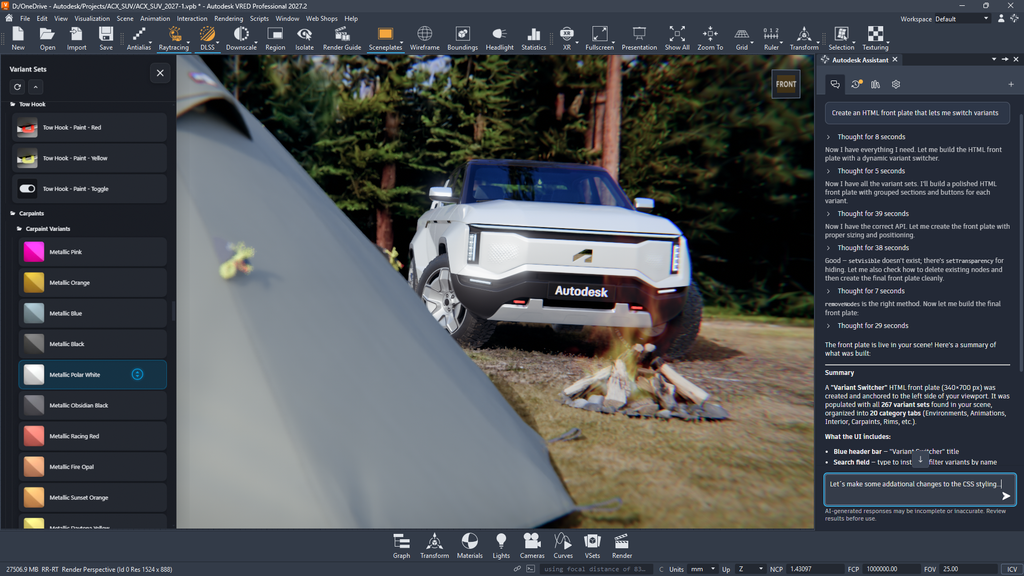
VRED 2027.2 adds two AI-driven capabilities, the VRED MCP Server and Autodesk Assistant, along with a substantial set of fixes across rendering, USD, Variant Sets, animation, XR, and physics. Here’s what’s new and what it means for your workflow.
Autodesk VRED MCP Server: AI tools connected to your live scene
The Autodesk VRED MCP Server, now in public beta, gives AI coding assistants a direct connection to an open VRED session. Connected tools can inspect the scene graph, update materials, import assets, and manage variants directly inside the session you’re already working in, rather than generating output you apply by hand afterward.
Two controls keep this safe for production work. Validate mode lets you test automation before it’s applied. The Script Editor lets you create and edit reusable scripts without running them immediately. Together, they make the MCP Server a practical fit for automating repetitive pipeline steps or building custom tools around VRED.
As with any AI-driven automation, verify results before they reach production, and save your project first.
Autodesk Assistant: help, support and execution in one interface
Autodesk Assistant is a conversational interface built into VRED and grounded in official VRED documentation, not open-ended AI. Ask it a question or give it a task, switching variants, assigning materials, selecting objects by tag, and it answers or executes directly inside your scene.
Its scope is defined: it does not create new materials or environments, and it requires an Autodesk account sign-in and an internet connection. As with the MCP Server, review and validate results before production use.
We’re covering Autodesk Assistant in depth in a dedicated post coming next week. Check it out for more details and example videos.
Other general improvements
Beyond the two AI features, this release includes fixes across rendering, materials, USD, Variant Sets, animation performance, XR, physics, scripting, and streaming security, along with a DLSS update.
Highlights include improved Vulkan performance when real-time antialiasing runs with Disable on Camera Movement enabled, correct upAxis and customData handling on USD import, and Group Selection (Ctrl+G) now creating a proper, fully movable group node.
See the VRED 2027.2 release notes for more details about this release.
This post was developed using a blend of human expertise and AI tools supporting the research and drafting. Our team shaped, edited, and fact-checked the final content to ensure accuracy and alignment.
Check out Autodesk Automotive on LinkedIn and visit the Design Studio YouTube channel for product updates, resources, and more.