 Pascal Seifert
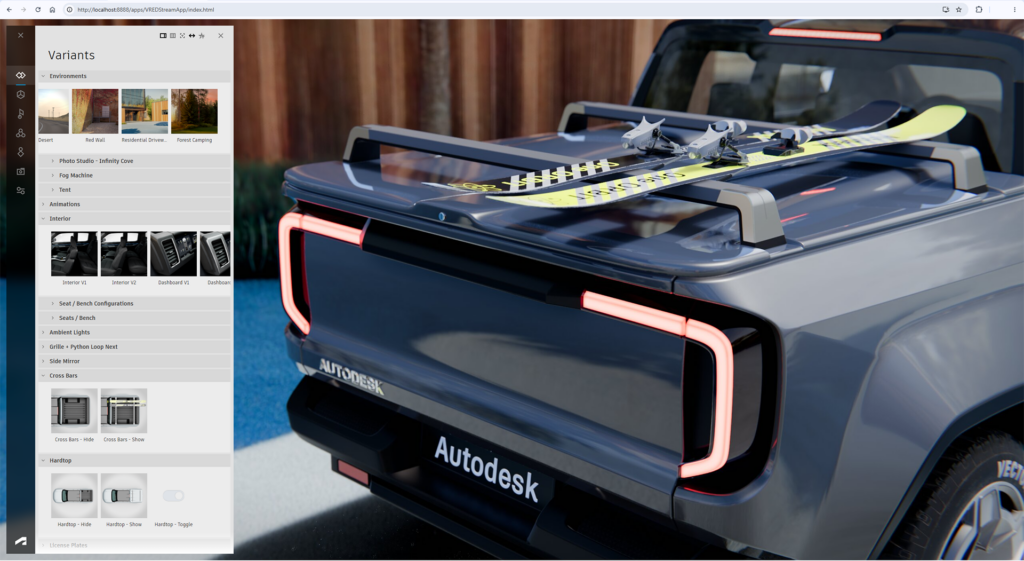
VRED 2027 raised the bar for real-time review, physics-based validation, and immersive collaboration.
VRED 2027.1 builds on that foundation with a release focused on the details that matter most in daily production: managing complexity at scale, rendering with greater physical accuracy, and keeping teams productive across desktop, streaming, and XR.
From a ground-up rewrite of Variant Sets to multi-bounce global illumination in the Vulkan pipeline, 2027.1 is less about introducing an entirely new workflow and more about making the workflows you already rely on faster, more reliable, and more capable.
Less friction. More fidelity. Fewer workarounds.
Variant management built for complexity
Reworked Variant Sets Module (Variant Sets 2.0)
If your projects have outgrown the old Variant Sets module, this is the update you’ve been waiting for. Variant Sets 2.0 is a complete rewrite: redesigned UI, hierarchical organization, advanced search, and flexible list, thumbnail, and content views that make even the most complex variant setups easier to manage and navigate.
The new layout follows the familiar pattern of the VRED Material Editor, with a split tree, vertical tabs, and an extended tree view that surfaces content previously buried in separate tabs. Geometry, materials, scripts, and more are visible at a glance, so you spend less time hunting and more time reviewing.
Workflow improvements go deep:
- Nested variants and groups: Nest Variant Sets as reusable references, with hierarchical and Favorite Groups to organize large projects.
- Metadata-driven control: Build resilient Variant Sets using metadata and search queries, not just names or IDs.
- Real-time validation: Instantly identify broken or empty links and clean them up from the Attribute View.
- Multi-selection editing: Copy, paste, and edit properties across multiple Variant Sets at once.
- Expanded tab support: Control annotations and render layers without Python, with improved Material Groups, clip planes, and animation playback.
- Smarter references: Import Variant Sets as read-only references, exclude individual sets from synchronization, and reset DLSS history for cleaner transitions.
- Full automation support: Use the Python v2 and Web APIs, with updated Streaming App and XR support for cascading variants and hierarchical groups.
Materials and rendering that hold up under scrutiny
VRED Material Improvements
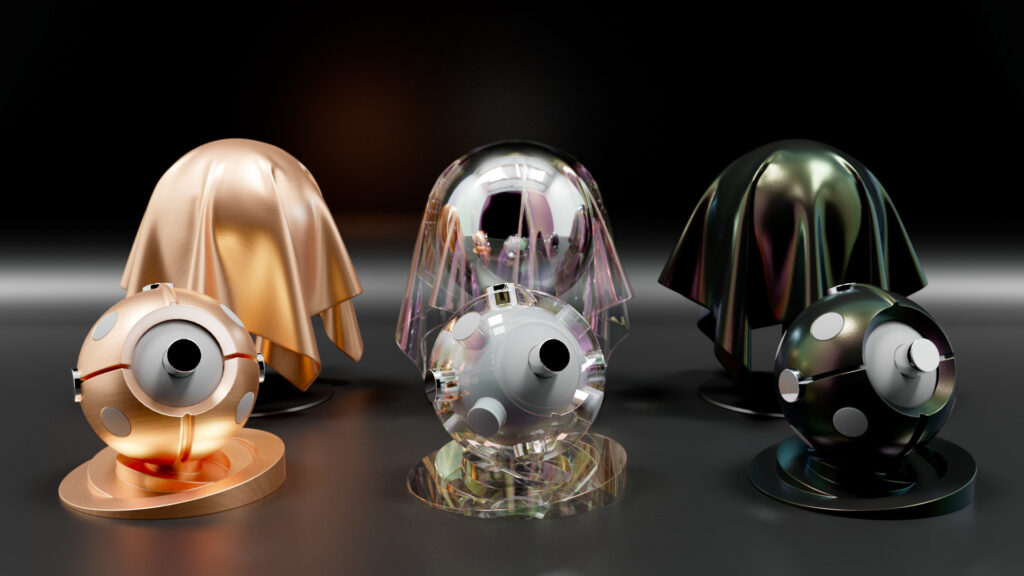
Thin Film support brings angle-dependent light interference to key VRED material types — Plastic, Metallic Car Paint, Chrome, Brushed Metal, and Glass — across Vulkan, GPU raytracing, and CPU raytracing. Oil slicks, soap bubbles, coated glass, and subtle metallic shifts now read correctly at every viewing angle.
GPU raytracing also gains Shader Execution Reordering (SER), dynamically regrouping divergent ray workloads at runtime for faster convergence and significantly improved performance in complex, material-heavy scenes.
MaterialX & MDL Improvements
MaterialX support continues to expand in 2027.1:
- Thin Film and Fuzz in Vulkan and precomputed raytracing: Previously limited to Full GI raytracing, these parameters now work across more render modes.
- NPR and toon shading: Open stylized visualization workflows using nodes like
viewdirection,facingratio, andgooch_shade. - Geompropvalue and Scenedata: Drive color and appearance from metadata, vertex colors, and renderer-specific properties.
- Time node support: Animate procedural effects directly from the scene timeline.
- Per-material optimization settings: Balance runtime performance against shader recompilation speed.
- Cutout transparency for rasterizers: Alpha textures on MDL and MaterialX materials now cast correct shadows in rasterizer modes.
Real-time rendering, closer to ground truth
Vulkan Improvements
- Ray-traced ambient occlusion and environment shadows in reflections: Indirect lighting detail now appears in reflective surfaces, not just the primary view.
- Raytraced Diffuse Global Illumination (GI): Multi-bounce indirect illumination in the real-time pipeline, producing more realistic lighting for automotive interiors, architectural scenes, and product design.
Find both settings under Visualization > Rasterization Settings > Real-time Light and Shadows.
Camera Tonemapping Improvements
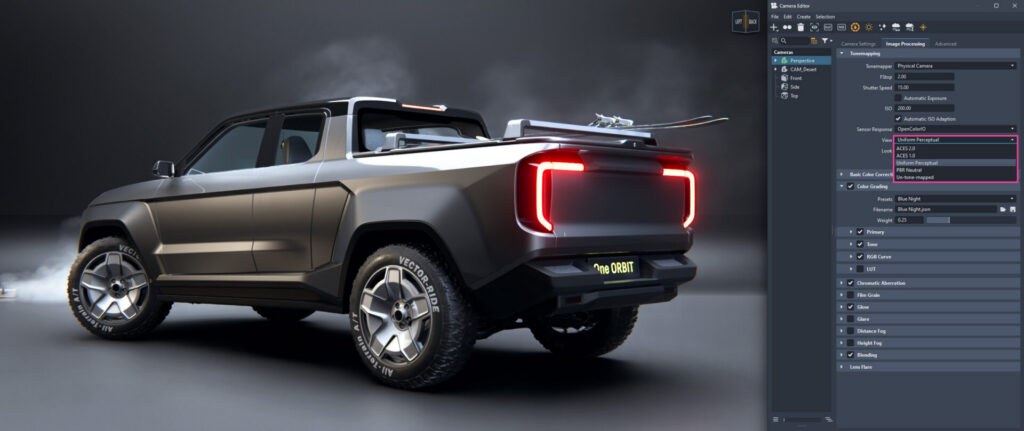
A new Uniform Perceptual tonemapping option for the Physical Camera, inspired by recent SIGGRAPH research, delivers a smooth filmic highlight shoulder, perceptually uniform color through the ICtCp color space, and consistent SDR/HDR output without manual curve tweaking.
Immersive review, refined
XR Improvements
- Detachable XR menu panels: Submenus for Variant Sets, Viewpoints, Collaboration, and Tools can be detached, arranged side by side, and re-docked.
- Gather All: Bring all collaboration participants to your position and orientation with a single action.
- Python-based custom XR tools: Add custom tools directly to the XR main menu bar.
- Full Variant Sets 2.0 support: Cascading variants, hierarchical grouping, and favorites work seamlessly in XR.
A stronger foundation for every workflow
Faceter Version 2
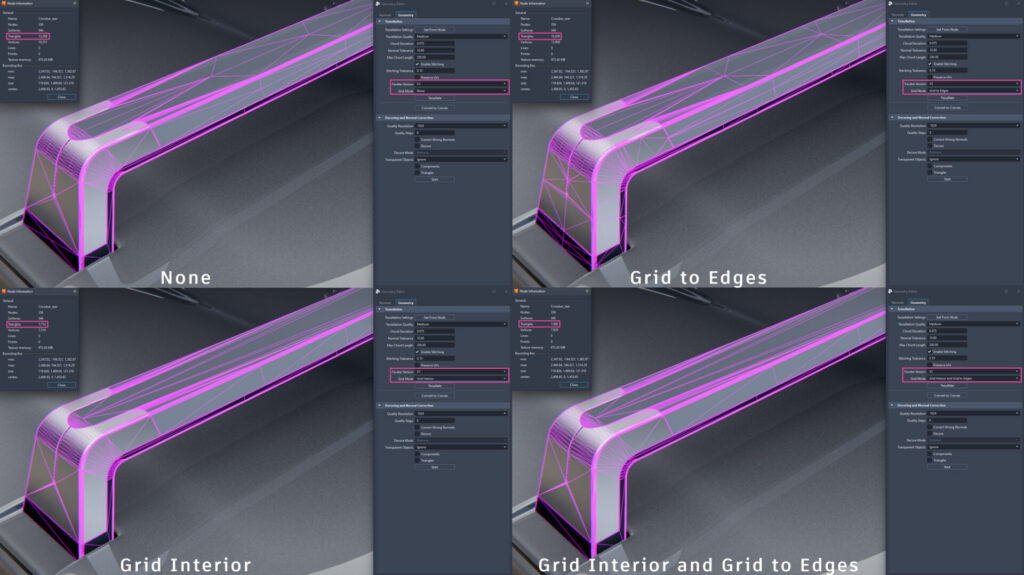
Faceter V2 is now the default for file import and geometry editing, with a reworked tessellation algorithm and new Grid Mode options for finer control over surface subdivision — more homogeneous triangles, simpler UV unwrapping, and often lower triangle counts without sacrificing quality.
General improvements
- Export control for VPB/OSB (exclude physics and constraint attachments)
- Lightweight CATIA V6 import for faster 3DXML performance
- Cross-instance material drag and drop between VRED sessions
- Responsive tabs, Terminal search, and Log Files in the Help menu
- Updated “Getting Started” tutorial videos
- Scripting and SDK updates for Variant Sets, Thin Film, and Faceter options
For technical details and bug fixes, see the 2027.1 release notes.
Explore VRED 2027.1 today
For more detailed information, please refer to the VRED 2027.1 What’s New help section. The VRED Learning Edition give you free access to VRED Professional for non-commercial use — download today and explore at your own pace.
If you’re new to VRED 2027, our What’s New in Alias and VRED 2027 post covers the base release — Live Referencing, real-time physics, Gaussian Splat support, and more.
This post was developed using a blend of human expertise and AI tools supporting the research and drafting. Our team shaped, edited, and fact-checked the final content to ensure accuracy and alignment.
Check out Autodesk Automotive on LinkedIn and visit the Design Studio YouTube channel for product updates, resources, and more.