 Autodesk Media & Entertainment
When you talk to Italian–Australian 3D artist Giacomo Cervi, one thing becomes clear almost immediately: he’s driven by a love of craft and a hunger to explore what’s possible.
Based in Milan and working across automotive, fashion, music, and sports, his path has taken him from student to teacher to professional artist, and now to a creator who’s reshaping his animation workflow with Autodesk Flow Studio.
But his journey with Flow Studio didn’t begin on a production. It started in a classroom.

Discovering Flow Studio in Research & Development
Giacomo first encountered Flow Studio during his time on the R&D team at BigRock Institute of Magic Technologies, where he had previously specialized in modeling and texturing.
“When the Flow Studio team presented their tool, I immediately understood its potential,” he recalls.
“It felt intuitive, powerful, and surprisingly artist‑friendly.”
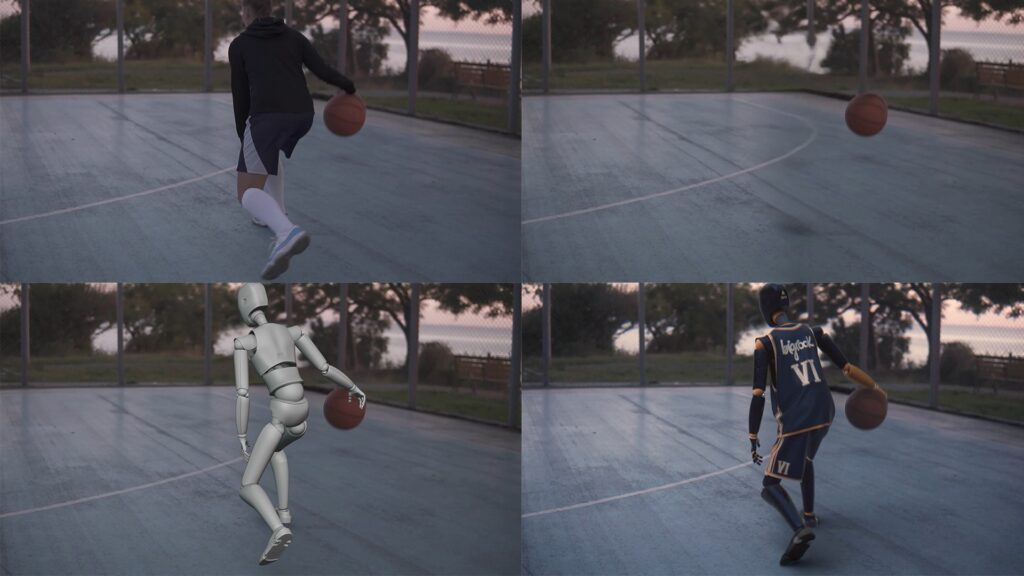
That first impression quickly turned into hands‑on exploration. Giacomo developed a full project inside Flow Studio, helped shape curriculum materials, and even supervised students as they learned the software.
“Seeing students learn and use it quickly confirmed how flexible and accessible Flow Studio is.”
For an artist who thrives on experimentation, this early exposure planted a seed—one that would soon transform his personal workflow.
A Major Shift: Speed, Creativity, and Solo Production
Like many artists, Giacomo often juggles personal projects between professional commitments. Time is precious, and technical overhead can slow down creative momentum. Flow Studio changed that.
“It allowed me to complete a fully animated and polished project in less than two weeks—as a solo artist.”
By reducing setup time and minimizing technical friction, Flow Studio gave him something invaluable: more space to focus on storytelling, performance, and visual ideas. Fewer barriers. More creativity.
Despite his passion for animation, Giacomo never considered himself an animator. “I’ve always loved animation, but I’m not an animator and don’t have motion capture gear,” he says.
“Flow Studio gave me an intuitive and fast way to experiment and create animated sequences I couldn’t have achieved alone.”
Suddenly, animation wasn’t a discipline reserved for large teams. It was something he could explore freely, and now, on his own terms.
Flow Studio in Giacomo’s Creative Pipeline
Flow Studio plays a central role in Giacomo Cervi’s animation workflow, especially during early-stage exploration. He uses it for previs and short test shots, experimenting with camera movement, timing, and performance before committing to full production.
“It’s one of my go-to tools when I want to visualize an idea before committing to full production.”
That early freedom helps him iterate faster, make stronger creative decisions, and maintain momentum—particularly on solo projects where flexibility is key. One feature stands out in his day-to-day work: Maya export.
“Maya export is the feature I use most. I get Flow Studio’s speed and Maya’s precision—the best of both worlds.”
Creativity, Community, and Momentum
For Giacomo, powerful tools are only part of the equation. Being part of the Autodesk Community Creators Group has become an important source of inspiration and growth.
“Spaces like this go beyond tutorials; they create opportunities for knowledge sharing, constructive feedback, and meaningful connections between artists at different stages of their careers.”
That sense of shared progress keeps him motivated and moving forward. More than just speeding up his workflow, Flow Studio has reshaped how animation feels for him—making the creative process more engaging, accessible, and fun.
“It didn’t just speed things up—it made animation feel exciting, fun, and possible.”