 Autodesk Media & Entertainment
Maya now includes MotionMaker, a new motion-generation system that lets you drive the motion of your character through higher-level user input. MotionMaker uses machine learning to train on a motion dataset, and then applies that learning—along with user-provided information about a character’s current position and trajectory—to predict the next pose. With repeated predictions, the result is natural, believable motion that animators can use as a foundation for crafting their character’s performance.
Here are some of the top questions Maya users have about the new feature and Autodesk product experts’ answers.
1. How is MotionMaker different from other AI-assisted motion-matching tools?
MotionMaker generates motion using machine learning, rather than “mixing” or blending motion clips together. It learns how the character moves and then re-creates natural motion based on the rules you give it, kind of like a virtual mocap stage.
2. How much data was used to train the MotionMaker models, and is the data available for others to use?
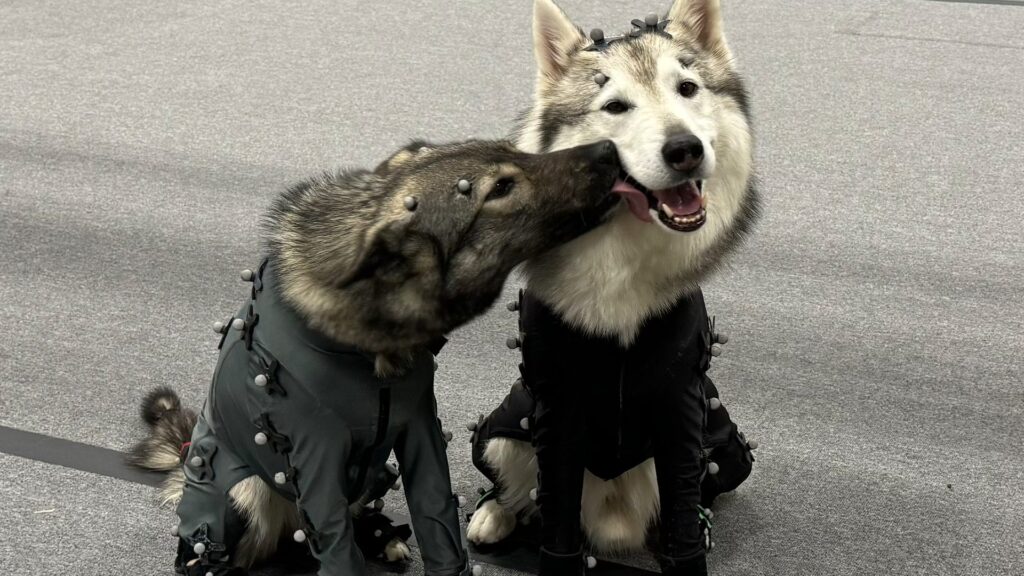
For this initial release, only Autodesk’s own motion capture data—30 minutes each of two canine models (yes, the dogs had a blast wearing the mocap suits!) and about one hour each of the male and female actors. No other data was used to ensure the training data was clean and not subject to IP considerations. Autodesk owns the data but is making the trained models freely available for anyone to use within Maya for any purpose.
3. What kind of rig does MotionMaker support?
MotionMaker generates animation on the Autodesk standard characters (male biped, female biped, and canine). Once generated, the animation can be retargeted to any character. Out of the box, the Autodesk characters have HIK characterization, making it easy to retarget on your HIK-characterized characters. However, if you’re not using HIK, any retargeting tool can be used to transfer the motion from the Autodesk standard characters to your own rig.
4. What are the current movement options in MotionMaker?
In its initial release, biped models support default movement—forward, side, and backward walk/run—and jump. The canine model supports default movement—jump, sit, and lie. The system takes into account the previous one second of animation, allowing you to start movement from a specific position. MotionMaker can be used in combination with keyframing to build more complicated sequences—for example, generating an initial run and jump sequence, which the animator can then combine with a carefully crafted keyframe movement pattern.
5. Can MotionMaker be used nondestructively with hand-keyed animations? And can I customize or modify the motion after it’s generated?
Absolutely. MotionMaker generations can exist on an animation layer separate from existing manually created animations. The generated motion is all baked into keyframes, so any of the usual tools can be used to edit the resulting animation. The MotionMaker system can also continue an animation that was started manually. For example, you could animate your character for the first 100 frames, generate motion for the next 100, and then animate the following 100. You can also add animation layers on top of the motion layer nondestructively, and then you can regenerate the motion layer without affecting your hand-keyed work.
6. Is MotionMaker going to be a threat to keyframe animators’ jobs?
Not if we can help it. MotionMaker was created out of a desire to enhance workflows, not replace artists or stifle creativity. Like any other tool within Maya, MotionMaker is intended to support animators in their art by accelerating some of the more tedious and time-consuming tasks. By quickly generating a simple motion sequence, MotionMaker creates a strong starting point that keyframe animators can then add to and expand, using their skill and artistry to focus on the nuance and intricacies of character animation.
7. Does the motion generation run locally, and does it require additional processing power?
The animation is generated using only your machine’s CPU. More and faster processors will speed up the generation (which is already pretty fast), but nothing goes out of your machine.
8. What updates and improvements are planned for future releases of MotionMaker (aka, will it be expanded to handle fighting, dancing, crawling, flying, faces, clothes, crowds, stairs, props, horses, bears, and dinosaurs)?
While we can’t guarantee any specific roadmap or timeline, all of these ideas are absolutely under consideration for future releases. MotionMaker is in active development and will be for the foreseeable future. Autodesk has its own mocap stage, which will be used to add additional types of motion and to expand the current models and train new ones.
9. Can I train MotionMaker on my own dataset and animation style?
Not in this initial release, but Autodesk is actively working on exposing the training UI in a future release so you can bring in your own data, including adding your own actions. This would allow you to build a custom library of basic styles and their associated actions by retraining the models with your own mocap footage or keyframe animation. There is also plan to provide guidelines and best practices on the amount and type of mocap data needed to retrain the models. This is the number one request received from users, so stay tuned!
10. How can I get MotionMaker?
MotionMaker is included at no extra charge in Maya 2026.1 (released June 4, 2025). You can find it under Windows -> Animation Editor -> MotionMaker Editor.
11. Where can I find tutorials on how to use MotionMaker?
The Maya Learning Channel on YouTube contains a great tutorial to get you started. There is also a QuickStart Guide in the Maya help documentation.