 Autodesk Media & Entertainment
Which Autodesk Flow Studio plan is right for you?
Somewhere in your head right now is a scene nobody else can see: a character who moves the way you imagine, a shot that plays out exactly like it does in your mind, a story that’s been waiting for the right tool to get it out into the world. Autodesk Flow Studio is built to close that gap: between the idea and the thing you can actually watch, share, and be proud of.
You don’t need a big team, expensive gear, or a massive budget to start. What you do need is a plan that fits where you are right now, and Flow Studio has one, whether you’re a curious first-timer, a working creator, or an entire studio. This guide walks through what each plan gives you, in plain language, so you can pick with confidence instead of guesswork.
What is Flow Studio, exactly?
Flow Studio is the creative AI platform for modern storytellers, where AI meets real 3D filmmaking.
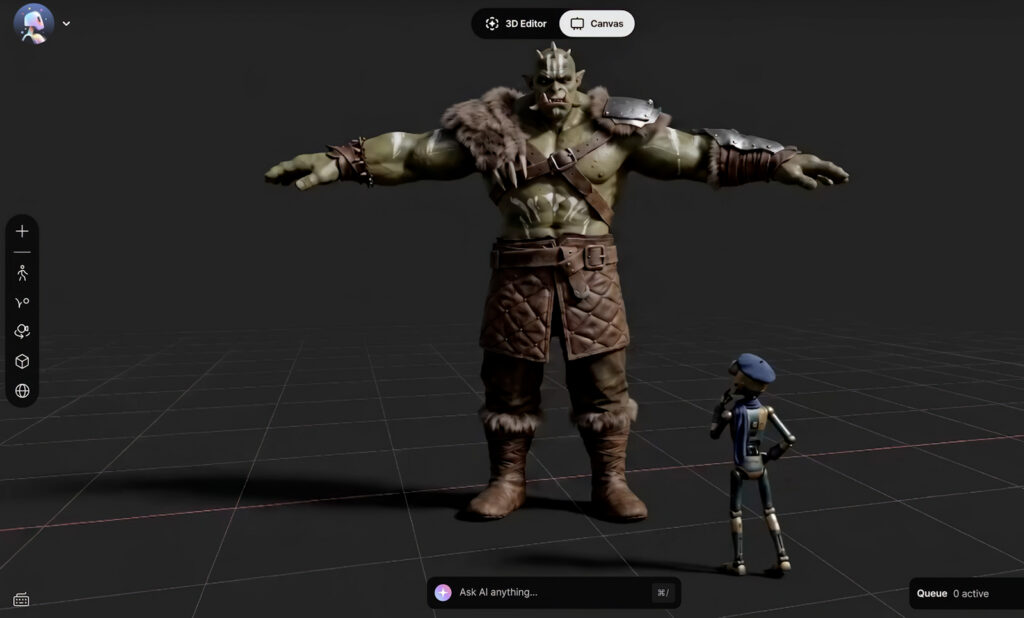
It brings together everything you need to take an idea from a spark to a finished scene: generate 3D assets, auto-rig characters for animation, and capture performances with AI Motion Capture. You can also build and direct full 3D scenes with 3D Editor + Canvas, where you get access to leading image, video, and audio models. However much of the heavy lifting AI does, the direction and creative control stays yours. You’re always the one deciding what a shot looks like, how a performance lands, and when it’s actually done.
How Flow Studio pricing works
Flow Studio comes in five standard tiers: Free, Lite, Standard, Pro, and Enterprise—plus a free Education option for eligible university students (18+) and educators. Every tier, including Free, includes 3D Editor + Canvas. What changes as you move up is capacity and the ability unlock more capabilities: more monthly credits, higher generation limits, higher export resolutions, more storage, more Motion Capture performers, and access to more advanced features.
For paid plans, Lite costs $7 USD/month, Standard costs $30 USD/month, and Pro costs $64 USD/month, each on a one-year term paid annually. Enterprise pricing is available by contacting sales. All prices in this article are listed in U.S. dollars. Visit autodesk.com and choose your locale to see Flow Studio prices in your local currency.
Here’s the lineup side by side. You can also view all five plans and explore Education access on the Flow Studio pricing page.
| Plan | Paid monthly | One-year term, paid annually | Credits per month | Best for |
| Education | Free | Free | 2,100 | Eligible university students (18+), educators, and educational institutions |
| Free | $0 | $0 | 300 | For the spark of a first idea—see what you can create before you commit |
| Lite | $10 USD/month | $7 USD/month | 2,100 | For creators who’ve outgrown experimentation and the real creative fun begins |
| Standard | $45 USD/month | $30 USD/month | 6,000 | For storytellers stepping up their craft—unlock more as your ambitions grow |
| Pro | $95 USD/month | $64 USD/month | 12,000 | For professionals with more stories than hours in the day—producing at the pace and quality clients expect |
| Enterprise | Contact sales | Contact sales | 48,000 | For studios operating at scale—where everything you build stays exactly where it belongs: with you |
Note: Education access is free for eligible users and follows separate eligibility and subscription terms.
A note on monthly credits
Every action that generates or processes something, such as a render, a capture, or an export, draws from a pool of monthly credits, which is really just the platform’s way of metering how much creating you’re doing.
Flow Studio Free: For the spark of a first idea
The Free tier is a great place to land your very first project—it costs $0 and includes 300 credits a month. This is where you start experimenting with AI-powered 3D workflows and get a feel for how Flow Studio fits into the way you like to create. More than that, it’s where you see what’s possible: you’ve got an idea, and now you can make it before you ever reach for a credit card.
With Free, you can run the whole workflow end to end: generate an animation-ready 3D character and add a custom performance with AI Motion Capture. When you’re ready to keep going elsewhere, export your work into Maya or Blender. You can also direct your own scene with 3D Editor + Canvas, where you have access to leading AI models.
Here’s what you get to work with at this level: 720p exports (watermarked), one concurrent generation and Motion Capture performer at a time, three custom character uploads, 1GB of storage, and uploads up to 100MB. That’s everything you need to learn the platform and get your first ideas off the ground.
What’s included with Flow Studio Free:
- 300 credits per month
- Access to Wonder 3D
- Access to Trellis 2.0
- Access to Flux.1
- AI Rigging (Preview)
- Live Action Easy
- AI Motion Capture
- 3D Editor + Canvas
- Access to leading AI models for 3D Editor + Canvas
- Mocap export
- Clean Plate export
- Camera Track export
- Maya and Blender scene exports
- One concurrent 3D asset generation
- AI Motion Capture for up to 1 performer
- Three custom character uploads
- 1GB of storage
- 100MB maximum video upload size
- Up to 720p export resolution
- Watermarked output
Flow Studio Lite: Where the creative fun begins
Lite is where Flow Studio gives you more room to build: more credits, more control, and more finished work to show for it. At $10 USD/month, or $7 USD/month on a one-year term paid annually, you get 2,100 monthly credits.
This is where experimenting turns into making bigger things, project after project.
With Lite, you can push further into every part of the workflow: rig and animate more ambitious characters, access Neural Layer for a more cinematic look, and capture two performers at once instead of just one. When you’re ready to take a scene further, export straight to Unreal Engine alongside Maya and Blender.
Here’s what this level adds: 1080p export with no watermark, five concurrent generations, Motion Capture for up to two performers, six custom character uploads, 5GB of storage, and uploads up to 250MB. That’s room to build a full body of work, not just test the waters.
What’s included with Flow Studio Lite (everything in Free, plus):
- 2,100 credits per month
- Unlimited 3D model downloads
- Nano Banana models for asset generation
- AI Rigging
- Five concurrent 3D asset generations
- Neural Layer
- Animation
- Camera Track and Clean Plate tools
- Unreal Engine scene exports
- AI Motion Capture for up to 2 performers
- Six custom character uploads
- 5GB of storage
- 250MB maximum video upload size
- Up to 1080p export resolution
Flow Studio Standard: For storytellers stepping up their craft
Standard is where Flow Studio meets you as your ambitions start to outgrow the basics. At $45 USD/month, or $30 USD/month on a one-year term paid annually, you get 6,000 monthly credits. This is where craft starts to matter as much as speed.
With Standard, you can reach for tools built for advanced production: Live Action Advanced gives you deeper control over blending CG characters into real footage, and MetaHuman animation support lets a captured performance drive Unreal Engine MetaHuman characters directly. When a scene needs to move into a larger pipeline, USD scene exports and Alpha Mask PNGs keep everything editable for the next stage.
Here’s what comes with it: up to 4K export, 10 concurrent generations, Motion Capture for up to three performers, 15 custom character uploads, 20GB of storage, and uploads up to 500MB—enough headroom to take on real animation, VFX, and live-action work. And when the volume outgrows even that, there’s a plan for exactly that.
What’s included with Flow Studio Standard (everything in Lite, plus):
- 6,000 credits per month
- Live Action Advanced
- 10 concurrent 3D asset generations
- AI Motion Capture with MetaHuman animation support
- USD scene exports
- Alpha Mask PNG exports
- Up to 4K export resolution
- 15 custom character uploads
- AI Motion Capture for up to 3 performers
- 20GB of storage
- 500MB maximum video upload size
Flow Studio Pro: For professionals producing at full volume
Pro is built for professionals who don’t have the luxury of waiting on one thing to render before starting the next. At $95 USD/month, or $64 USD/month on a one-year term paid annually, you get 12,000 monthly credits.
With Pro, all features are unlocked and you can run more of everything at once: more concurrent generations, more custom characters, more Motion Capture performers captured in a single take. Character Pass export adds another layer of flexibility for VFX and compositing work, giving you editable character elements with transparent backgrounds, ready for a compositor to finish.
Here’s what comes with it: 15 concurrent generations, Motion Capture for up to four performers, 50 custom character uploads, 80GB of storage, and uploads up to 2,000MB. That’s enough room to produce at the pace and quality clients and audiences expect, shot after shot.
What’s included with Flow Studio Pro (everything in Standard, plus increased capacity and):
- 12,000 credits per month
- 15 concurrent 3D asset generations
- Character Pass export
- PNG export
- Up to 4K export resolution
- 50 custom character uploads
- AI Motion Capture for up to 4 performers
- 80GB of storage
- 2,000MB maximum video upload size
Flow Studio Enterprise: For studios operating at scale
Enterprise is what Flow Studio looks like when it’s built for a whole studio. Pricing is available by contacting sales, and it comes with 48,000 monthly credits, enough to keep an entire team creating without anyone waiting in line.
With Enterprise, a full team can work at once: capturing performances from up to seven people, running twenty generations concurrently, and relying on the same advanced Live Action, Motion Capture, and pipeline workflows available in Pro, just without a volume ceiling. AI data opt-out is enabled by default, so what your studio builds stays exactly where it belongs: with you.
Here’s what comes with it: 20 concurrent generations, Motion Capture for up to seven performers, and a full 1TB of storage—studio-scale headroom, built for teams rather than individuals. If you outgrow even that, that’s exactly what the conversation with sales is for.
What’s included with Flow Studio Enterprise (everything in Pro, plus increased capacity and):
- 48,000 credits per month
- 20 concurrent 3D asset generations
- Up to 4K export resolution
- 1TB of storage
- 2,000MB maximum video upload size
- 50 custom character uploads
- AI Motion Capture for up to 7 performers
- AI data opt-out enabled by default
Flow Studio Education: Free for eligible students and educators
If you’re an eligible university student (18+) or educator, there’s a better place to start than the standard Free plan—Flow Studio Education is free and includes 2,100 monthly credits, seven times what Free offers, at no cost.
Education is designed for real coursework and classroom use, not just a scaled-down trial. You can generate and rig 3D assets, capture performances with AI Motion Capture, build and direct scenes in 3D Editor + Canvas, explore Live Action Easy, and turn video into 3D scenes with Animation / Video to 3D Scene. When it’s time to take a project further, you can export into Maya, Blender, Unreal Engine, or USD-based workflows, so what you build in class can keep growing beyond it.
Consider a student portfolio piece built around two characters: you generate or select the characters, use AI Rigging to prepare them for animation, and record a performance that AI Motion Capture turns into editable animation. From there, you build the scene, compose your shots, and work the camera in 3D Editor, then move to Canvas to refine the visual treatment. If you want to keep developing it, export into Maya, Blender, Unreal Engine, or a USD pipeline.
What’s included with Flow Studio Education:
- 2,100 credits per month
- AI Motion Capture
- Live Action Easy
- Animation / Video to 3D Scene
- 3D Editor + Canvas
- AI Rigging
- Neural Layer
- Wonder 3D
- Trellis 2.0 and Flux.1
- Nano Banana models for asset generation
- Camera Track and Clean Plate
- MoCap, Clean Plate, and Camera Track exports
- Maya, Blender, Unreal Engine, and USD scene exports
- Access to leading AI models for 3D Editor + Canvas
- Unlimited 3D model downloads
- Five concurrent AI 3D asset generations
- AI Motion Capture for up to 2 performers
- Up to 1080p export resolution
- 5GB of storage
- 250MB maximum video upload size
- Six custom character uploads
How Education subscriptions work
Education access scales with your role:
| Role | Education subscription |
| Student | 1 user, renewable 1-year subscription |
| Educator | Up to 250 users, renewable 1-year subscription |
| IT administrator | Up to 3,000 users, renewable 3-year subscription |
Eligibility requirements apply to Education access.
Education or Free: Which is better for students?
If you qualify, Education wins this comparison easily. You get seven times the monthly credits of Free (2,100 versus 300), plus broader workflow access and meaningfully higher capacity across the board: 1080p exports, AI Motion Capture for up to two performers at once, five concurrent generations, 5GB of storage, and 250MB uploads. Education and Free do have their own separate feature and usage limits, so it’s still worth checking the current plan comparison for the specific capabilities your project needs. But for eligible students, there’s rarely a reason to start anywhere else.
Why Flow Studio is worth learning as a student
If you’re studying animation, VFX, filmmaking, game development, or anything nearby, Flow Studio is a genuinely useful place to learn how AI-assisted creation fits into real 3D production—not a toy version of the workflow, the actual thing. You can practice markerless AI Motion Capture, work with editable 3D characters and scenes, direct cameras and animation, generate assets, and carry your work into established 3D pipelines when you’re ready.
3D Editor + Canvas also gives you a natural on-ramp if you’re newer to 3D: start in Canvas, where the 2D workflow is more approachable, and move into 3D Editor as you get comfortable taking direct control of cameras, animation, composition, and scene construction. For students building a portfolio, that progression is an accessible way to practice motion capture, scene building, camera work, and animation as part of a real production workflow, the kind of work that actually belongs in a reel.
What does Education offer educators and schools?
Education scales past a single student, too. An Educator subscription supports up to 250 users on a renewable annual term, and the IT administrator option supports up to 3,000 users on a renewable three-year term, enough for a department or an entire institution to bring Flow Studio into the classroom and manage access for everyone at once.
How Flow Studio credits actually work
Every plan runs on a monthly credit allowance, from 300 with Free up to 48,000 with Enterprise, with Education included at 2,100.
| Plan | Credits per month |
| Free | 300 |
| Education | 2,100 |
| Lite | 2,100 |
| Standard | 6,000 |
| Pro | 12,000 |
| Enterprise | 48,000 |
Credits power the actual work — running or processing a project in Flow Studio. Different types of projects use different amounts, and every second of processing draws from the same pool, so a longer or more complex shot naturally costs more than a quick one.
Your credits refresh every month based on your plan, giving you a clean pool to work with each time — just know that unused credits don’t carry over.
When does it make sense to go paid?
The Flow Studio Free plan gives you real room to explore the core workflow, test ideas, and figure out how Flow Studio fits into the way you like to create—there’s no rush to leave it. As you create more, you’ll likely notice the shift yourself: a paid plan gets you more credits, higher export resolutions, more simultaneous generation, more storage, larger uploads, more Motion Capture capacity, and access to more advanced production capabilities.
There’s no benefit to moving up before you need to. But when your projects start calling for more capacity, higher-quality output, or capabilities Free simply doesn’t have, the right plan is waiting. Moving up is less about spending more and more about giving your work room to become what you actually pictured.
Which Flow Studio plan should you choose?
The right Flow Studio plan is simply the one that fits the work in front of you today, with room to grow into whatever comes next.
Choose Free to explore and create at lower volume. Choose Lite once you’re using Flow Studio regularly and want more room to work. Choose Standard when you need more advanced animation, VFX, or production capabilities. Choose Pro for higher-volume professional work, and Enterprise when you’re operating at studio scale. And if you’re an eligible student, educator, or institution, check Flow Studio Education before you buy anything at all.
Wherever you start, the path is the same: begin with what you need, and let your plan grow alongside your ambition, from generating your first idea to directing exactly the story you set out to tell.
Flow Studio pricing FAQ
Flow Studio has five standard tiers—Free, Lite, Standard, Pro, and Enterprise—plus Education access for eligible users. Free costs $0. Lite costs $10 USD/month paid monthly or $7 USD/month on a one-year term paid annually. Standard costs $45 USD/month paid monthly or $30 USD/month annually. Pro costs $95 USD/month paid monthly or $64 USD/month annually. Enterprise requires contacting sales. Education access is free for eligible users.
Yes, Flow Studio has a Free plan that costs $0 and includes 300 credits per month, along with 3D Editor + Canvas, AI Motion Capture, Live Action Easy, Wonder 3D, and other capabilities subject to plan limits. Qualified students and educators also have a separate free Education option.
Yes, 3D Editor + Canvas is included across every standard Flow Studio tier, including Free. Available AI models, usage credits, generation limits, and some features vary by plan.
The Lite plan which is $10 USD/month paid monthly or $7 USD/month on a one-year term paid annually. It includes 2,100 monthly credits, 1080p maximum export resolution, Neural Layer, Animation, and meaningfully more capacity than Free.
Free includes 300 credits per month, Lite and Education include 2,100, Standard includes 6,000, Pro includes 12,000, and Enterprise includes 48,000. Education eligibility requirements apply.
Choose Lite for regular individual creation, and Standard once you need more advanced production workflows. Standard adds Live Action Advanced, MetaHuman animation support, USD scene exports, up to 4K output, and 6,000 monthly credits.
Standard is the right call if its advanced features and 6,000 monthly credits already meet your needs. Move to Pro when you need greater professional production capacity—it doubles monthly credits to 12,000 and increases storage, upload limits, concurrent generations, custom characters, and Motion Capture capacity.
Yes, the Educator option supports up to 250 users on a renewable one-year subscription, and an IT administrator option supports up to 3,000 users on a renewable three-year subscription.
Yes, Flow Studio supports editable scene exports for Maya, Blender, Unreal Engine, and USD-based workflows such as 3ds Max, though specific export options vary by subscription.
No, Flow Studio’s markerless AI Motion Capture reads facial expression, body movement, and hand motion directly from footage—no suit, markers, or special hardware required.
Many AI 3D model generators focus on creating individual assets. Flow Studio goes further by helping creators generate editable models, build scenes, direct creative decisions, and refine content within a connected workflow designed for professional production.
Yes, Flow Studio includes a free commercial tier so you can explore AI character creation before upgrading. Many AI character creation tools focus on generating a single image or model. Flow Studio helps you generate editable 3D characters, maintain character consistency, build scenes, direct performances, and prepare assets for professional production workflows.
Annual and multi-year subscriptions come with a 30-day return policy; monthly subscriptions come with a 15-day return policy. Flow Studio also includes 24×7 online support and resources.